The question comes round every few months: JPEG, AVIF or WebP in 2026? The usual answer is “AVIF, it is the newest and it is supported now”, and the usual answer is not wrong about either of those facts. It is just answering a different question from the one a WordPress site owner is actually asking.
So we measured it. Five photographs, encoded from the same lossless source, with the quality matched objectively rather than by eye. The short version: AVIF really is about 28% smaller — and it costs about five times the CPU to produce. For most WordPress sites that trade goes the other way.
Where support actually stands
Let us dispose of the support argument first, because it is the one most often used and it is the weakest one.
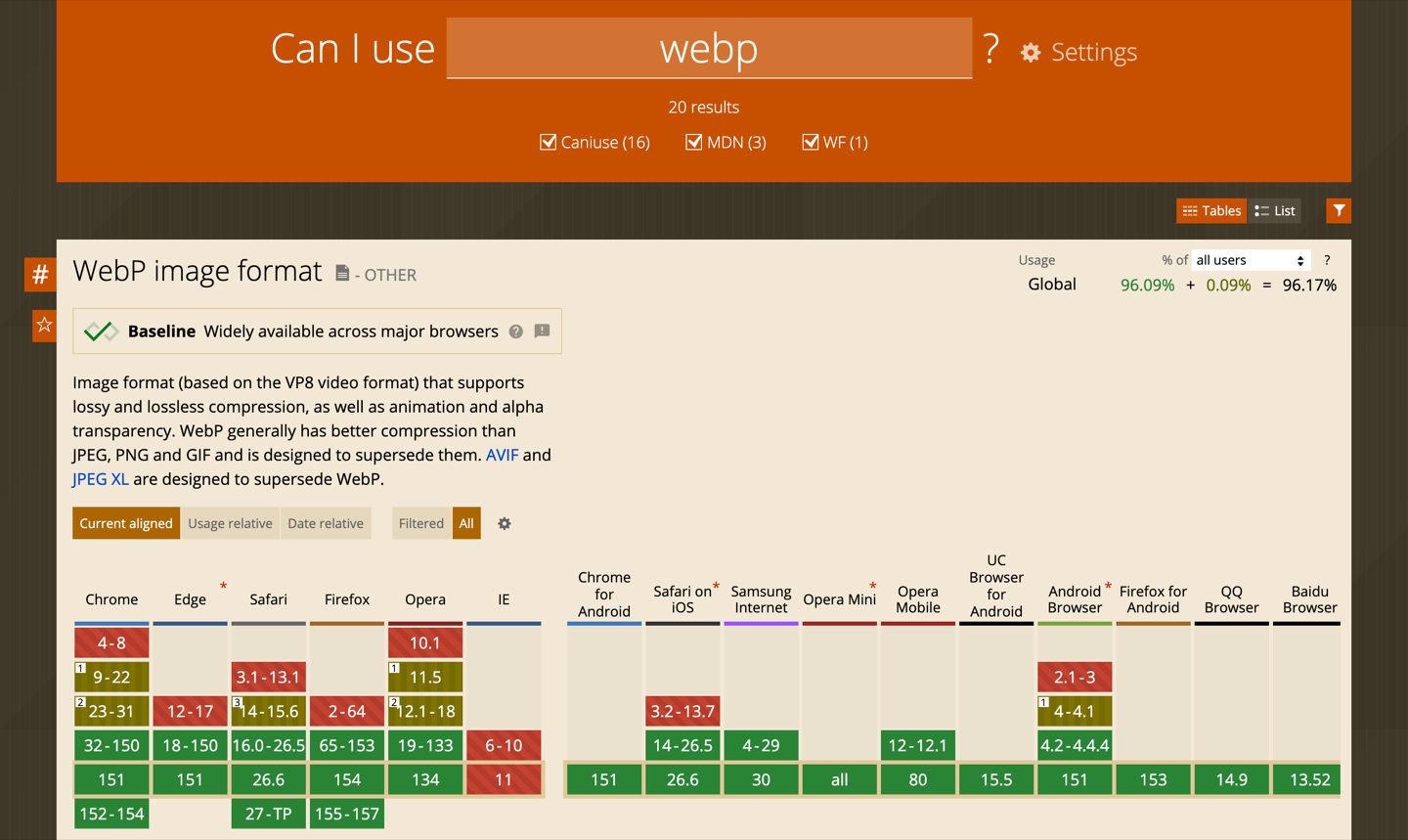
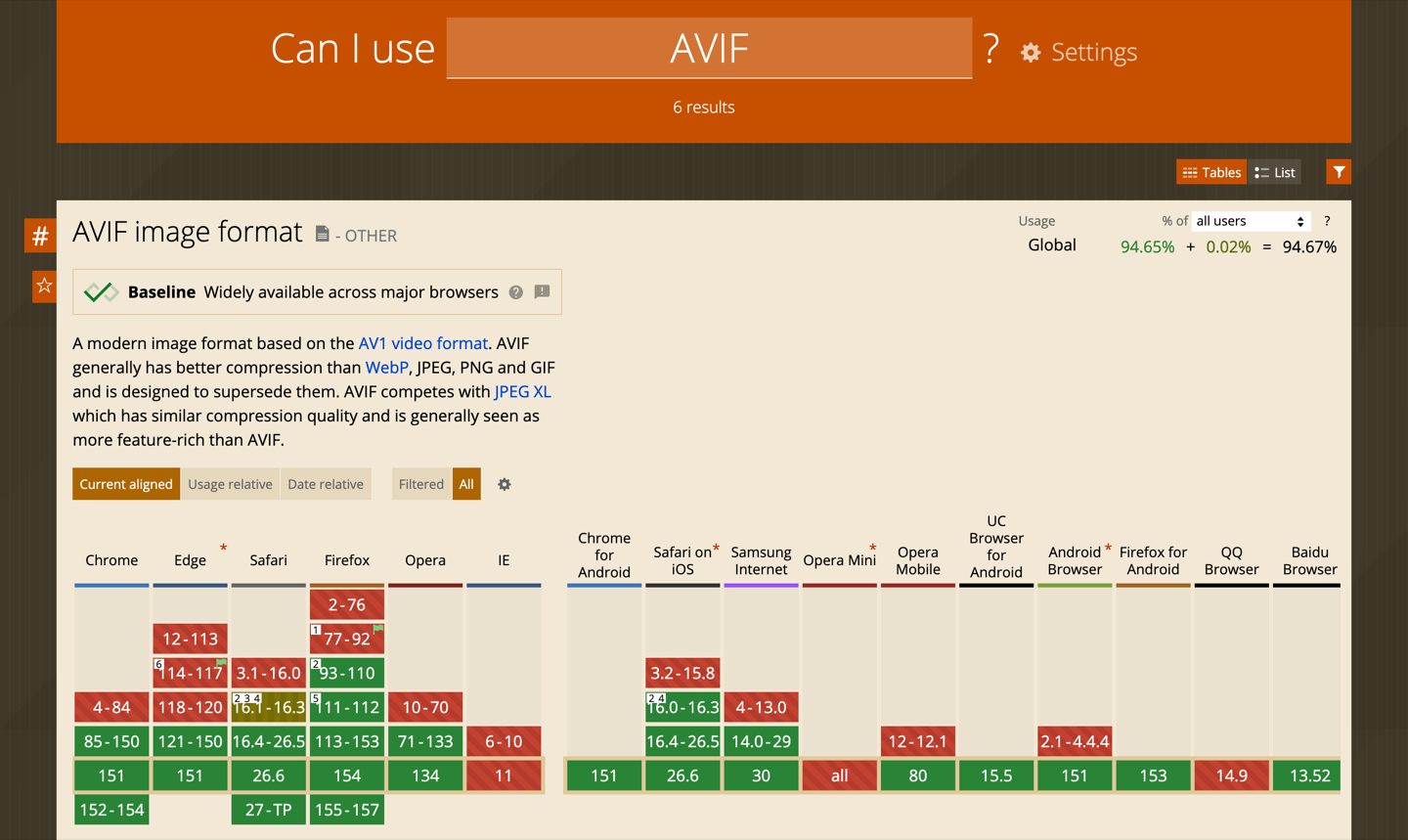
Both are green. AVIF is genuinely, widely supported now — anyone still saying “AVIF is too new” stopped checking two years ago. The gap between them is 1.4 percentage points of global traffic.
Where that 1.4% lives is more interesting than its size. Compare the two tables column by column and the pattern is consistent: WebP got there earlier, so it has aged into more devices. Opera Mini supports WebP and does not support AVIF at all. Samsung Internet has had WebP since version 4 and AVIF only since 14. The Android Browser, QQ Browser and the older Safari line tell the same story. If your audience skews towards cheap Android handsets, in-app browsers or markets where data-saving proxy browsers are common, that tail is not evenly distributed — it is concentrated in your traffic.
Having said that: this is a solved problem for anyone using <picture> with fallbacks, which is what every competent image plugin and CDN does. Browser support is a reason to be careful with an AVIF-only strategy. It is not, on its own, a reason to choose WebP. The real reason is further down.
What we measured
Comparing image formats fairly is harder than it looks, because “quality 75” means something different in every encoder. So we did not compare at equal quality settings — we compared at equal measured quality.
- Five photographs at 1600px wide: a detailed landscape, a portrait, a product shot, a texture-heavy close-up and a dark interior.
- Each decoded to PNG first, so both encoders start from the same lossless source.
- WebP encoded once at quality 75 with
cwebp1.6.0 — the common default. - AVIF encoded with
avifenc1.4.2 (aom 3.14.1) across a range of quality settings. - Every output decoded back and scored with SSIM against the source. For each image we then picked the AVIF file whose measured quality was equal to or better than the WebP one, so the comparison never flatters AVIF.
- Cost recorded as CPU time (user + system), not wall-clock.
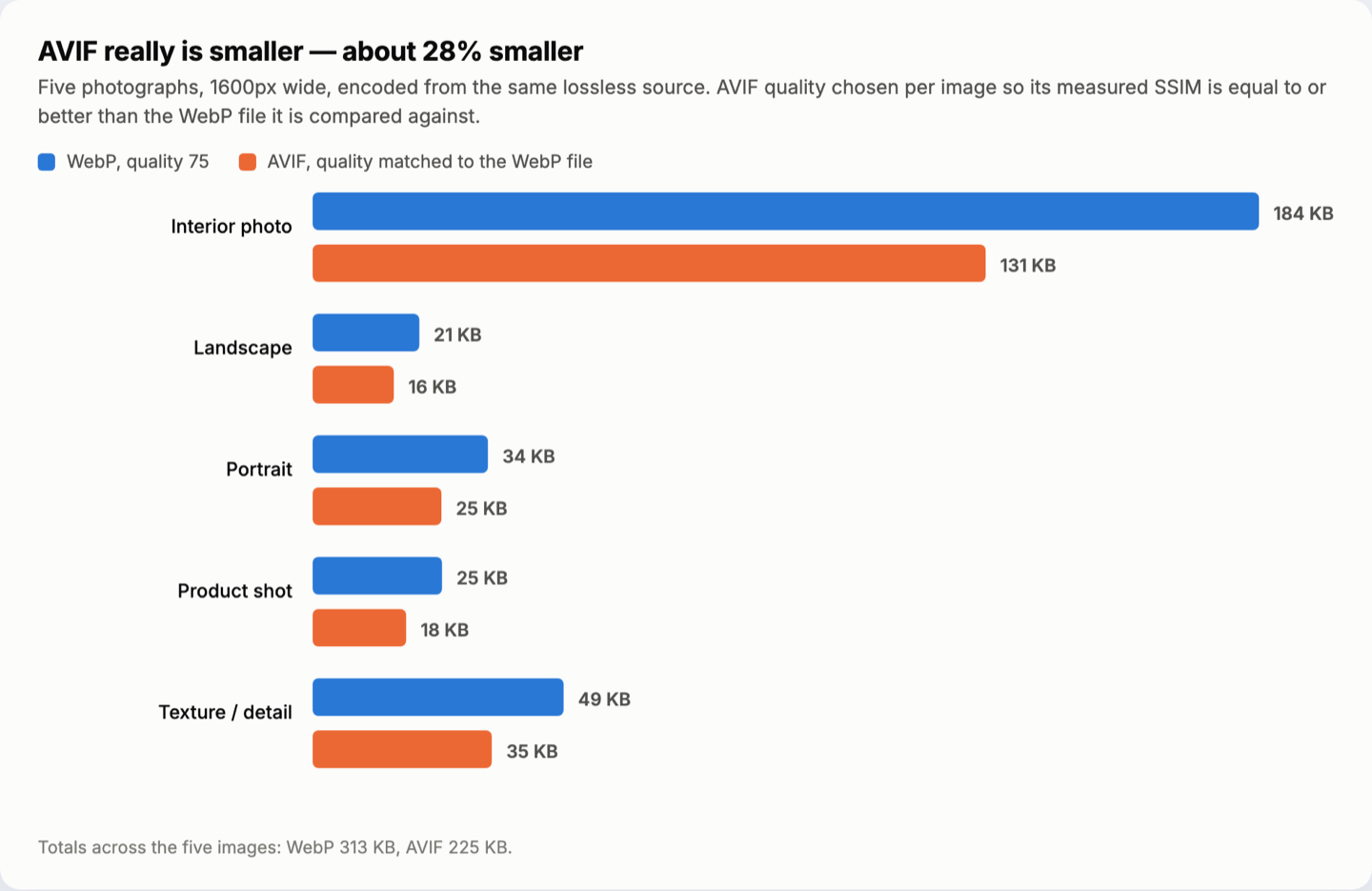
AVIF is smaller every time: between 24% and 29% smaller, averaging 28% across the set. That is a real advantage and nobody should pretend otherwise. On the dark interior shot — the kind of image WebP handles worst — it was 29% smaller.
Then we looked at what those bytes cost to make.
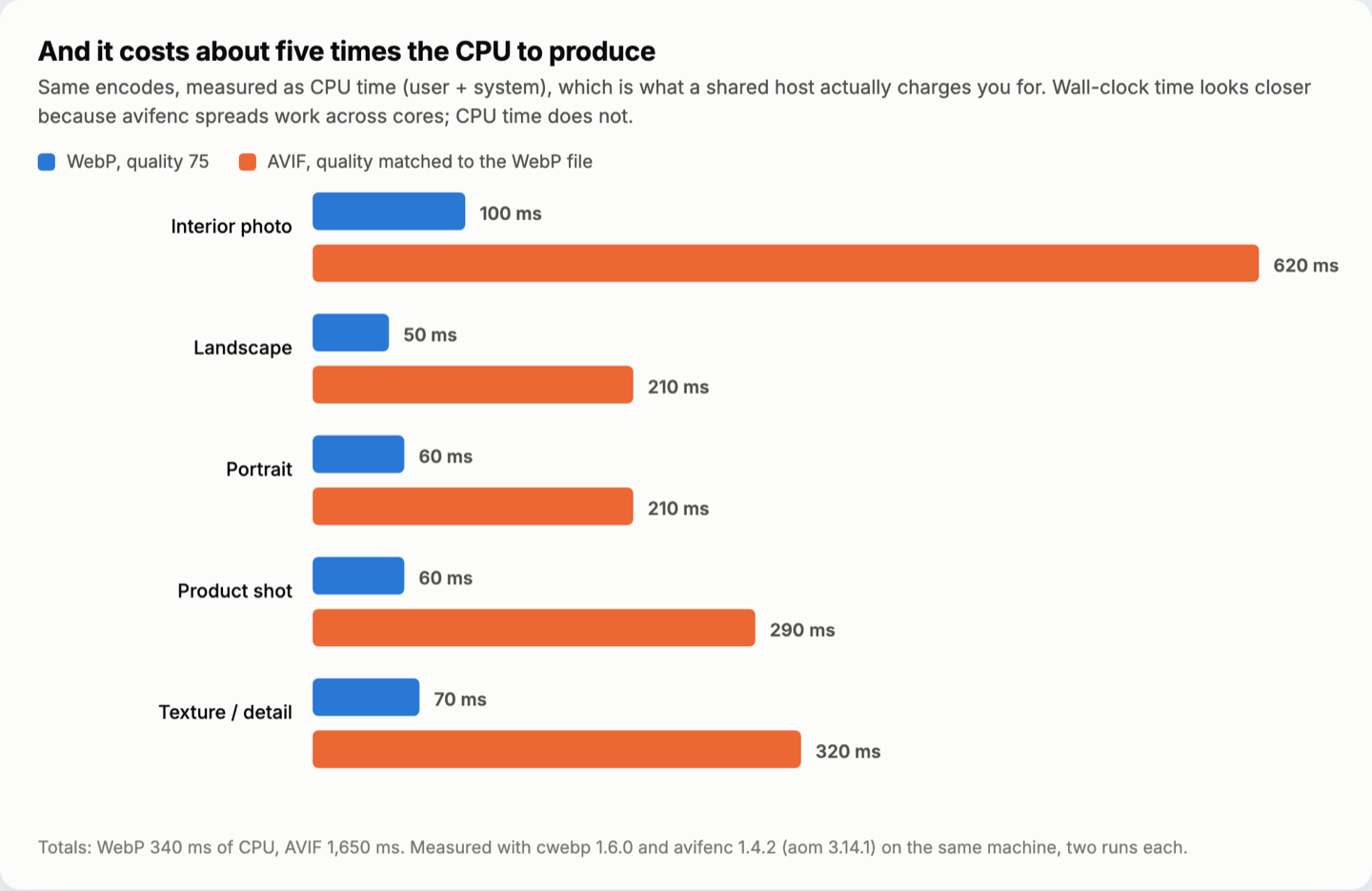
Four to six times the CPU, averaging 4.9× across the set. And there is a trap in this number worth spelling out: measured as wall-clock time on a modern multi-core laptop, the two look almost identical — around 60–130 ms each. That is because avifenc spreads its work across every core it can find, while cwebp largely does not. On a machine with cores to spare, AVIF looks free. On a shared host with a CPU quota, or a VPS with two cores also running PHP and MySQL, the CPU-time number is the one you actually pay.
| Image | WebP q75 | AVIF, quality matched | Size | CPU |
|---|---|---|---|---|
| Dark interior | 184 KB / 100 ms | 131 KB / 620 ms | −29% | 6.2× |
| Landscape | 21 KB / 50 ms | 16 KB / 210 ms | −24% | 4.2× |
| Portrait | 34 KB / 60 ms | 25 KB / 210 ms | −27% | 3.5× |
| Product shot | 25 KB / 60 ms | 18 KB / 290 ms | −28% | 4.8× |
| Texture | 49 KB / 70 ms | 35 KB / 320 ms | −29% | 4.6× |
| Total | 313 KB / 340 ms | 225 KB / 1,650 ms | −28% | 4.9× |
Why that trade usually favours WebP on WordPress
A 5× CPU multiplier on one image is nothing. The reason it matters on WordPress specifically is that you are never encoding one image.
- Every upload becomes many files. WordPress generates a thumbnail, medium, medium-large, large and full — and most themes and WooCommerce add their own on top. Ten registered sizes is normal. That 5× is applied to every one of them, on every upload.
- Bulk regeneration is where sites fall over. Converting an existing media library of a few thousand images is the moment the multiplier becomes a real number: a job that takes twenty minutes in WebP takes an hour and a half in AVIF, and on shared hosting it is far more likely to hit a CPU limit or a timeout partway through.
- Your PHP build may not even offer it. WordPress can produce AVIF only if the server’s image library can. On the machine we ran this on, PHP 8.3’s GD extension has
imagewebpbut noimageavif— WebP works, AVIF silently does not. That is still a common shape of hosting in 2026, and it is worth checking before you plan around AVIF. - Storage and cache multiply too. Keeping originals plus WebP plus AVIF for ten sizes each is three times the disk and three times the CDN cache entries, for a saving you already captured most of at the first step.
And that last point is the one that decides it. Going from a typical unoptimised JPEG to WebP is the big win — frequently 30–50% off, sometimes far more on an unprocessed camera upload. Going from WebP to AVIF is another 28% of an already much smaller number. The first step is where the page weight actually goes away; the second is a refinement that costs five times as much to compute.
When AVIF is worth it anyway
This is not an argument against AVIF. It is an argument about where the cost lands. AVIF is clearly the right choice when:
- Something else does the encoding. If images are converted by a CDN or an image service rather than your PHP process, the CPU is not yours and the whole objection disappears. Take the 28%.
- The images are large and few. Full-width hero images, photography portfolios, anything where a single file is hundreds of kilobytes. Encoding one hero in AVIF is cheap; encoding a thousand thumbnails is not.
- Bandwidth is a real line item. High-traffic sites where 28% of image bytes is measured in money rather than milliseconds.
- The content suits it. Dark images, gradients and smooth areas are where AVIF’s lead is widest — our interior shot was its best result, and its worst was a flat product photo where the gap narrowed.
And JPEG?
Still necessary, still not sufficient. JPEG remains the universal fallback that every browser, every email client and every scraper can read, and a well-tuned MozJPEG at quality 80 is a lot better than most people assume. What it should not be in 2026 is the only thing you serve. If you are shipping raw JPEGs straight from the camera through WordPress with no conversion step at all, the format debate is not your problem — that is where the real weight is.
The practical recommendation
- Default everything to WebP at quality 75–80, with JPEG as the fallback. This is the step that removes most of your image weight, and it costs almost nothing to produce.
- Serve with
<picture>or content negotiation so the browser picks what it can read. This is what makes the support question stop mattering. - Add AVIF selectively — hero images, large featured images, the photography pages. Not every registered thumbnail size.
- Check your host first. If
imageavifis missing from your PHP build, decide whether you are moving that or moving on. - Measure the page, not the format. A correctly sized, lazily loaded WebP beats a full-resolution AVIF that the browser downloads and then scales to 300px. Dimensions and loading strategy still outrank codec choice.
If your optimisation plugin does this for you, the decision is mostly a setting. Swift Performance handles the conversion, the responsive sizes and the fallbacks as part of its image optimisation, which is the part of the job that actually moves the numbers — in our side-by-side test against WP Rocket, image handling was where the difference showed up most clearly.
Frequently asked questions
Should I convert my whole media library to AVIF?
Probably not in one pass, and definitely not on shared hosting. If you want to, convert the largest images first — that is where nearly all the saving is — and leave the small thumbnails in WebP. The bottom half of a media library by file size usually contributes a rounding error to page weight.
Does WordPress support AVIF out of the box?
WordPress supports it if your server does. The gating factor is the image library in your PHP build — GD or Imagick — not WordPress itself. Check Tools → Site Health → Info → Media to see which formats your install can actually write.
Is AVIF slower for visitors to decode?
Decoding is more expensive than WebP, but it is a much smaller effect than encoding and it is offset by having fewer bytes to download in the first place. On a low-end phone with a slow connection, the smaller file usually still wins. Encoding cost is a server problem; decoding cost rarely decides anything.
What about JPEG XL?
Technically excellent and still not broadly supported in browsers, which makes it a non-starter for a public WordPress site today. Worth watching, not worth planning around.
Do these numbers apply to my images?
The direction will; the exact percentages will not. Compression is extremely content-dependent — our own five images ranged from 24% to 29% on size and 3.5× to 6.2× on CPU. Run the same comparison on a handful of your own photographs before committing to a pipeline.
The takeaway
AVIF is the more modern format, it is now widely supported, and it makes smaller files — all three of those are true, and none of them is the whole question. WebP is 1.4 points better supported, reaches further into the older and cheaper end of the device market, produces files that are already close to as small, and costs roughly a fifth of the CPU to generate across an entire media library.
For most WordPress sites that is the better trade: WebP as the default everywhere, JPEG as the fallback, AVIF where the images are big enough for the extra 28% to be worth paying five times for. The newest format is not automatically the optimal one — and on a shared host, the difference between those two words is measured in timeouts.