
Until now, Must-Have Redirect did one thing well: when a visitor hit a 404, it looked for the closest published URL and sent them there. That covers typos and small slug changes, but it leaves the site owner guessing. Which URLs are actually broken? Where do those visitors come from? What should never be redirected at all?
Version 0.2.0 answers those questions. It adds a 404 log you can act on with one click, skip rules, automatic 301s when you change a permalink, regex rules, 410 Gone, conditional rules and a URL tester. The rule editor has also been rebuilt. Here is what each part does, with screenshots from a test store.
The 404 log: see what is broken, fix it from the same row
The new 404 Log tab lists every URL that ended in a 404 on your site. For each one you see the referrer, the number of hits, when it was last seen and what happened: plain 404, auto-redirected by smart 404, skipped, or 410 Gone.
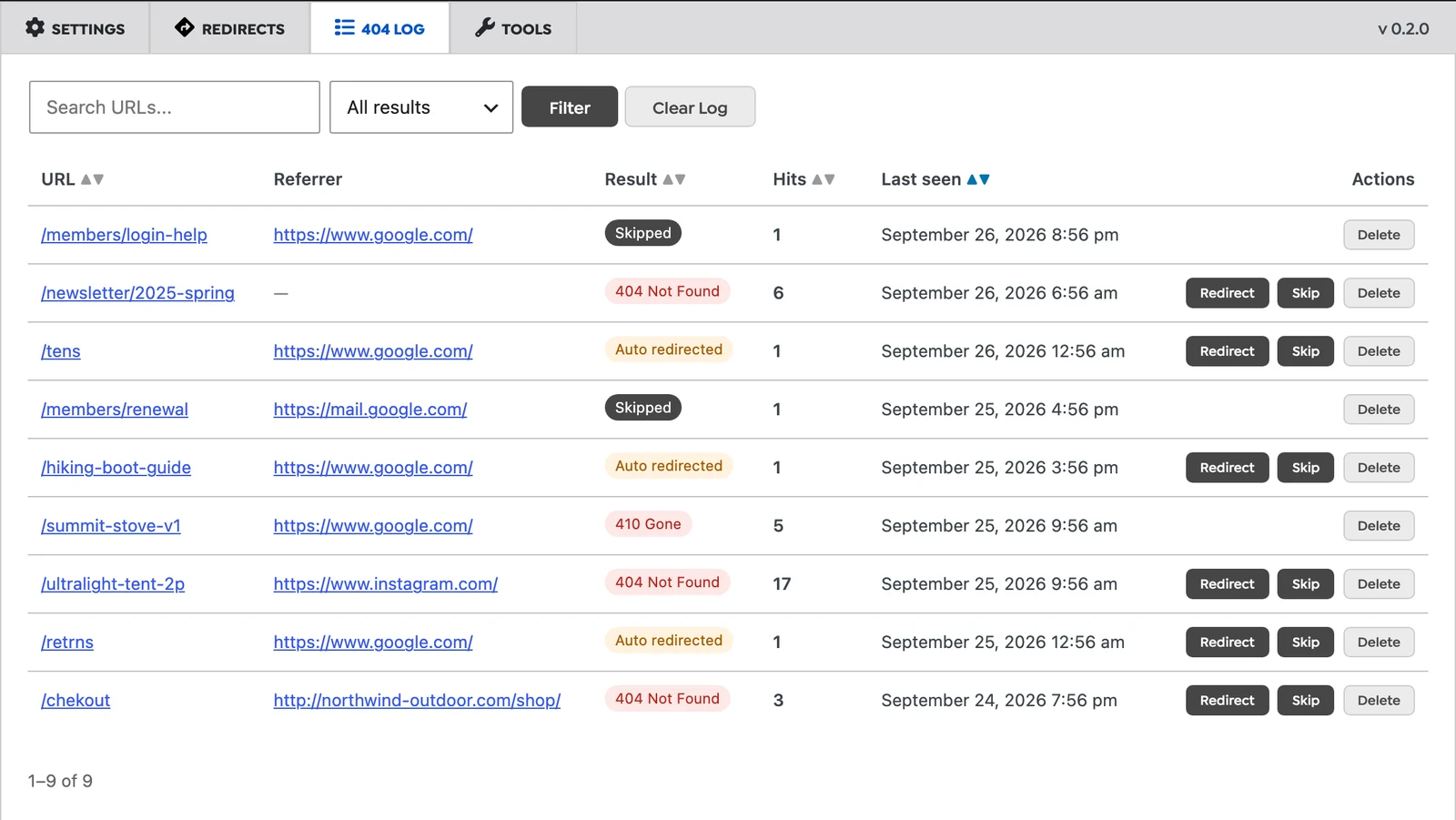
The referrer column is often more useful than the URL. In the screenshot, /ultralight-tent-2p has 17 hits, all from Instagram, so an old post is still sending buyers to a product that moved. /chekout comes from your own shop page, which means there is a typo in a link on your own site. Each row has Redirect and Skip buttons, so you can turn the entry into a rule without copying the URL anywhere.
The log does not record bots or requests for files such as images and scripts, so it is not flooded by vulnerability scanners looking for wp-config.php.bak. Entries are removed after 30 days, and the table is capped at 5,000 rows. You can switch the log off on the Settings tab.
Skip rules: URLs that should stay 404
Some URLs should never be redirected: a members area that should not hand out guesses, an old API endpoint that clients should see failing, or a page you removed on purpose. Smart 404 cannot know that, and neither can WordPress itself, which has its own guessing logic for 404s and old slugs.
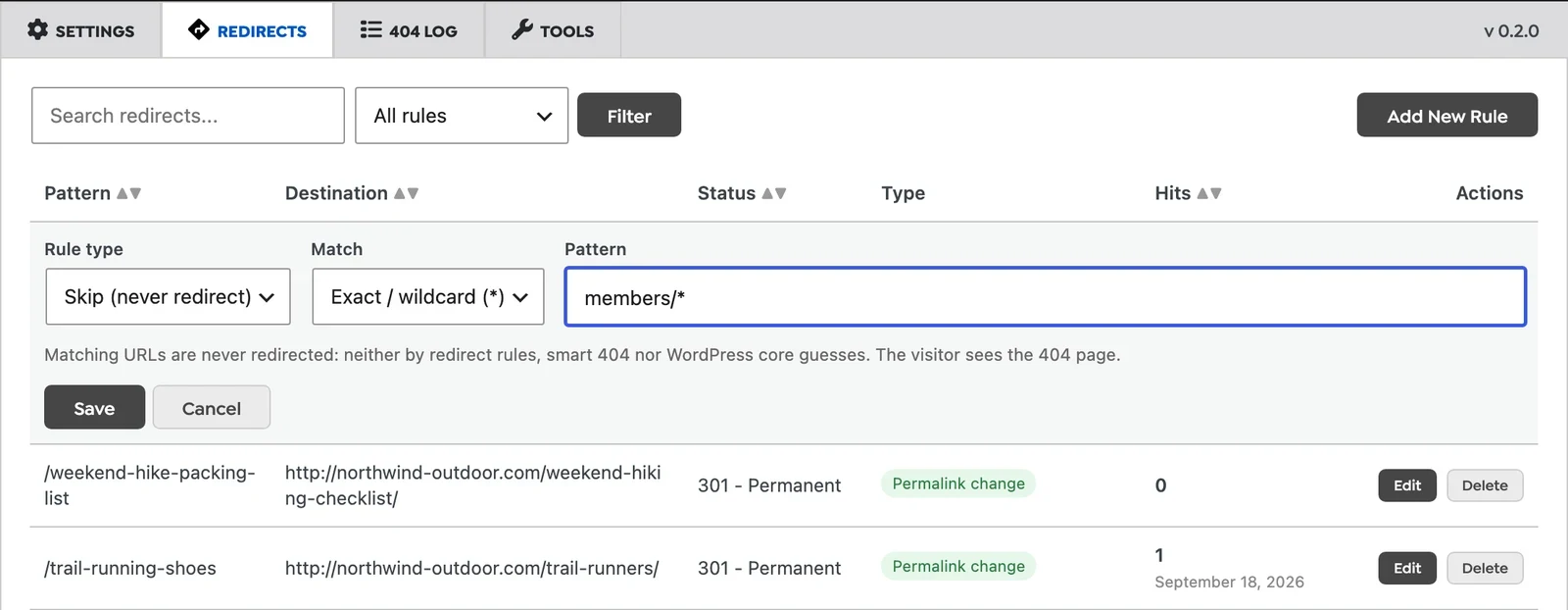
A skip rule tells the plugin to leave a URL alone. It stops redirect rules, smart 404 and the WordPress core guesses for that URL, and the visitor gets your normal 404 page. Skip rules support wildcards, so members/* covers the whole section.
Automatic 301 when you change a permalink
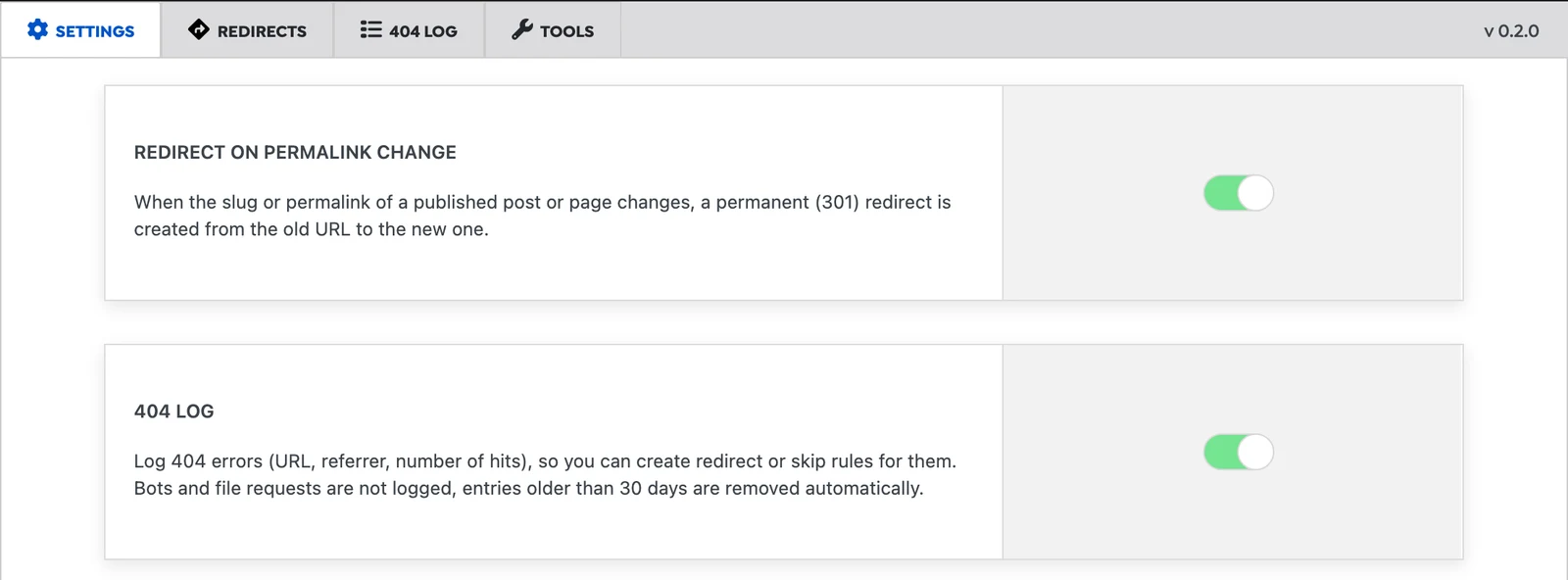
When you change the slug or permalink of a published post or page, the plugin now creates a permanent 301 redirect from the old URL to the new one. If the page had already been renamed before, it also points the older automatic rule to the new URL, so you get A to C and B to C instead of a chain from A to B to C. Rules you added by hand are left as they are. Chains cost crawl budget and add a round trip for every visitor, and Google recommends pointing redirects straight to the final URL.
One limitation: the redirect is created for the post or page you renamed. If you rename a parent page, the child pages’ URLs change as well, but the plugin does not create rules for them. After renaming a parent, add a wildcard rule such as old-parent/* pointing to /new-parent/$1. We cover the bigger version of this problem in how to change permalink structure safely.
A rebuilt rule editor: regex, 410 and conditions
Rules are now edited inline, in the table. The editor has four new options:
- Regular expressions with captures.
^blog/(\d{4})/(\d{2})/(.*)$to/news/$3/moves a whole date-based archive in one rule. Wildcard rules also pass on what matched:old-store/*to/shop/$1. - 410 Gone. For content you removed on purpose. A 410 tells search engines the page is gone for good, rather than missing by accident. Google treats 404 and 410 almost the same, but a 410 makes your intent explicit and keeps the URL out of the “fix me” part of your 404 log.
- “Apply even if the page exists”. By default, rules only fire when the URL would otherwise be a 404. Tick this for a campaign URL like
/black-fridaythat should redirect even while a real page exists at that address. - Conditions. Limit a rule to logged-in or logged-out visitors, mobile or desktop, or a browser language. A typical use is
/appsending phone users to the app store.
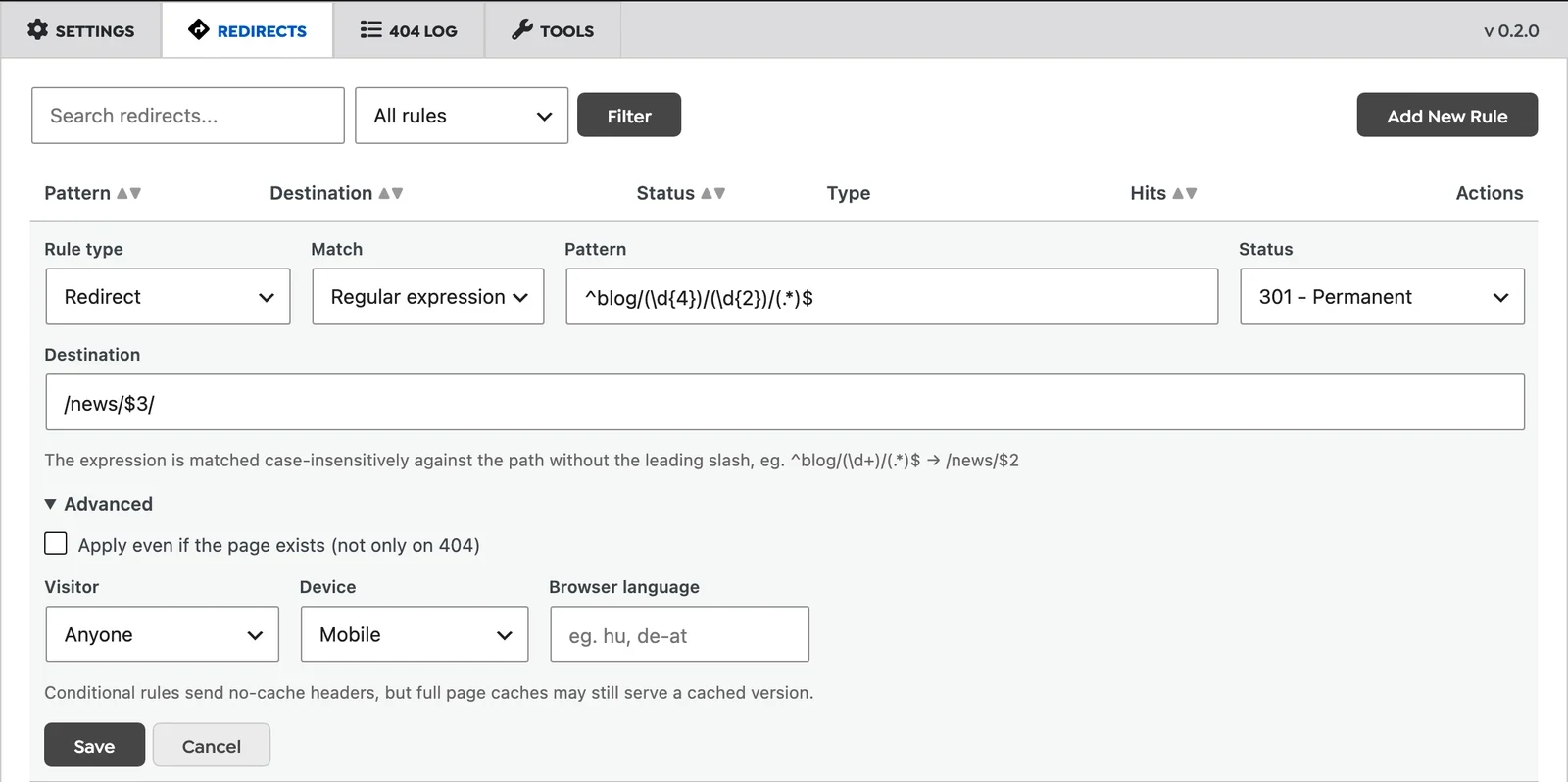
A note on conditions and caching: conditional rules send no-cache headers, but a full page cache in front of WordPress may still serve the cached version of the page to everyone. If you rely on device or language rules, check that your cache varies by those or skips those URLs. Why WooCommerce stores in particular are hard to cache is covered in this article.
The rule list: hits, last hit and where each rule came from
Every rule now shows how many times it fired and when it last did, so you can spot rules nobody uses. Badges show where a rule came from (Manual, Auto, Permalink change, Imported) and how it matches (Wildcard, Regex, Always, Conditional, Skip). The list can be searched, sorted and filtered by rule type.
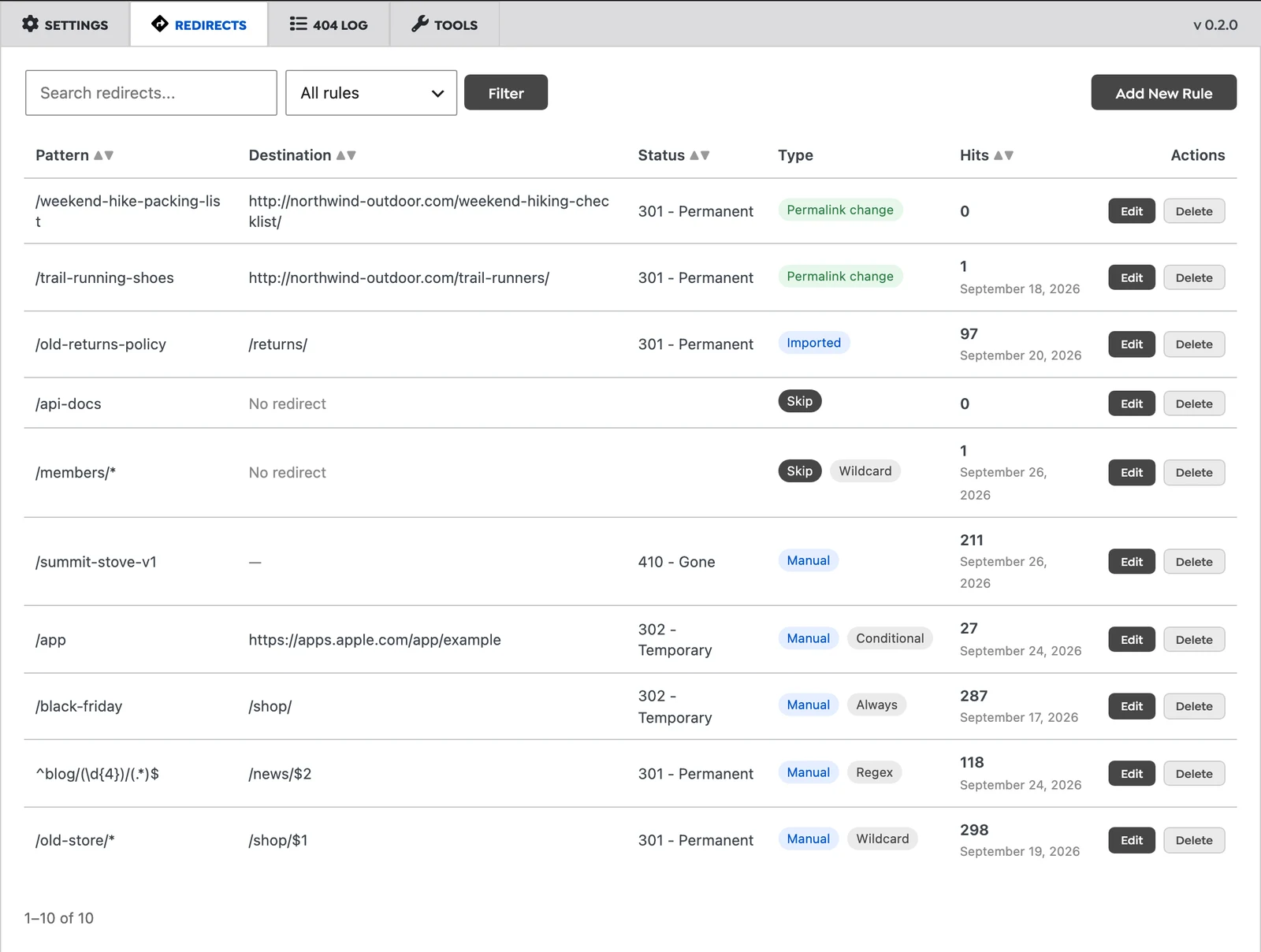
Rules created by smart 404 are temporary 302s. Every Sunday, the ones that fired fewer than 10 times that week are removed, while the busy ones stay. If one of them is clearly right, like /tens to /tents/ above, press Keep and it becomes a permanent 301 rule.
Tools: test a URL before you change anything
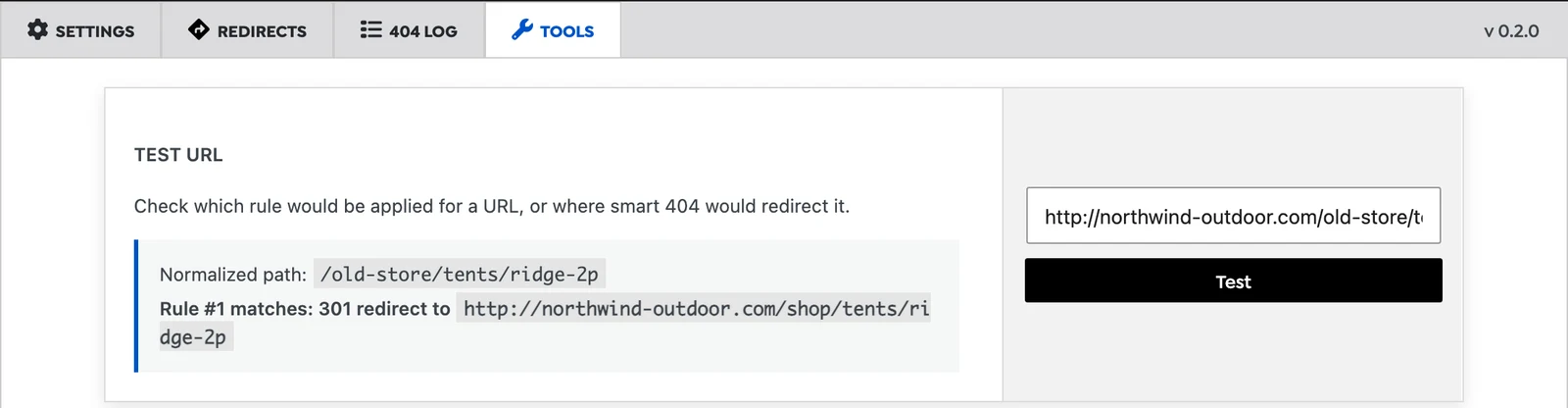
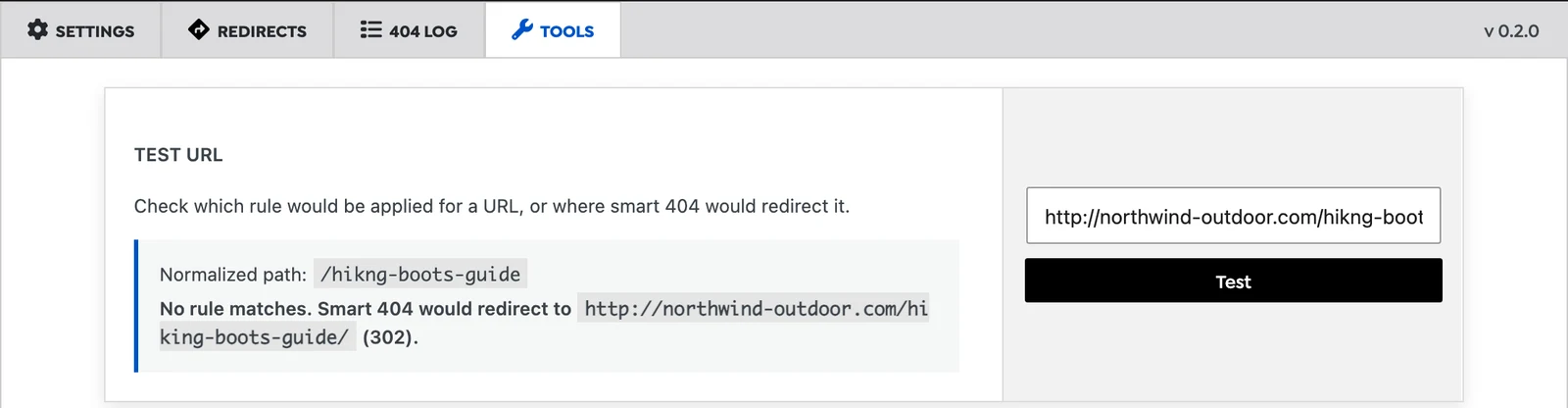
The URL tester on the Tools tab shows what would happen to any URL: which rule matches and where it goes, or, if no rule matches, where smart 404 would send it. This is the quickest way to check a regex before real visitors hit it.
The same tab has CSV export and import, and an importer for existing rules from Redirection, the redirect module of Rank Math and Yoast SEO Premium. The free Yoast plugin has no redirects, so there is nothing to import from it. The import block only appears when the plugin finds rules from one of these on your site.
In what order things happen
With several sources of redirects on one site, the order matters. On each request, Must-Have Redirect checks your rules first, including skip rules. Then WordPress runs its own redirects, such as the exact old-slug redirect it keeps when you rename a post. Only after that does smart 404 look for a similar URL, and the request is logged. So a manual rule always wins over a guess, and WordPress’s own exact match wins over smart 404’s approximate one.
Fixes in 0.2.0
- The rule editor was rebuilt: adding and editing rules, search, sorting and pagination all work reliably.
- The similarity threshold setting (Close Match, Likely Relevant, Fallback) is now applied.
- Smart 404 now suggests pages as well as posts.
- Manual rules now work on every URL, including paths that contain words like “admin” or “login” and file URLs.
- Smart 404 no longer overrides WordPress’s exact old-slug redirect.
- Wildcards, query strings and non-ASCII URLs are matched correctly.
- Uninstalling now removes the rules table, and update checks were hardened.
The full list is in the changelog. Existing rules are kept when you update.
Frequently asked questions
Is smart 404 AI?
No. It compares the requested slug with the slugs of your published content using string similarity (Levenshtein distance), preferring the same post type. The threshold setting decides how different two slugs may be. It is fast, predictable, and you can see its choice in the URL tester before it happens. More on how it works in how smart 404 matching fixes broken URLs.
I tested smart 404 with curl and nothing happened. Why?
Smart 404 and the 404 log ignore requests from command-line tools and scripts (curl, wget, python-requests and similar), because those are almost always bots. Your manual rules still apply to them. Test smart 404 in a browser, or use the URL tester.
Should I use a skip rule or a 410?
Use 410 when the content is permanently removed and you want search engines to drop it. Use skip when the URL should keep behaving like a normal 404, but you do not want anything, including WordPress itself, to guess a replacement.
Where is the plugin in the admin menu?
Under Tools, Must-Have Redirect. If you use Rank Math, Yoast, AIOSEO, SEOPress or The SEO Framework, it moves under that plugin’s menu as “Smart Redirects”, next to the rest of your SEO settings.
The takeaway
Smart 404 catches the typos. Version 0.2.0 adds the parts you need to manage the rest: a log that shows which broken URLs get real traffic and from where, rules for the cases a guess cannot handle, and redirects that appear on their own when you rename content. If you already use the plugin, update from the Plugins screen. If you are new to the topic, start with why 404 errors hurt your SEO and user experience and SEO-focused handling of 404 pages.


