

For freelancers and agencies
Clean hacked sites. Win new clients.Must-Have Security, up to 70% off.
New web design clients are harder to find every year. Worried site owners aren’t: 11,334 new WordPress vulnerabilities were published in 2025, 42% more than the year before. Every hacked site needs someone to clean it and keep it clean. With Must-Have Security that someone is you: scan, clean, lock the door, and the client pays you to keep it locked.
- 14-day money-back guarantee
- Can’t lock you out of the admin
- Keeps protecting if the subscription lapses
 Must-Have Security, lifetime, 1 siteBlack Friday, paid once−$119
Why now
The attacks grew. So did the work.
Updates can’t close a hole that has no fix yet, and bots don’t wait for one. A site owner who has been hacked once wants someone who can clean the site and keep the next attack out. That’s an easier first conversation than a redesign, and it turns into a monthly plan.
- 11,334new WordPress vulnerabilities in 2025, up 42% on 2024
- 5 hoursmedian time from a hole going public to its first exploit
- 46%of them had no fix when they were disclosed
What you sell
Find them, clean them, keep them.
-
Find the sites that need you
Run a prospect’s site through our free Security review: signs of a hack, known vulnerabilities in the installed versions, and what it exposes. Nothing is changed on the site. Send the owner what you found.
-
Clean the hacked site
Scan it, review every finding with the file in front of you, delete the malware and restore modified core files from the official WordPress package. Nothing is deleted behind your back.
$150–$400 what a cleanup usually costs the owner
-
Keep it clean, every month
Code control refuses executable code nobody allowed, so the backdoor can’t be written back, and the firewall stops attacks before WordPress loads. That’s the care plan you sell.
$60–$100 a month, a typical agency care plan
The math
One new client pays for it. 299% back in our example.
That’s a $250 cleanup and 3 months of a $75 care plan, on a lifetime license for that site. Put in your own prices.
A 1-site license covers one client’s site; each new client gets their own.
See the lifetime licensesReturn = (what your clients pay − the license) ÷ the license. With a 25-site lifetime license, two such clients already bring back 138%. Lifetime and the 25 and 100-site plans are sold only during Black Friday: they open on the offer page after the plugin’s video, the 25 and 100-site lifetime licenses after its three questions too.
What agencies charge: Codeable, WordPress maintenance pricing (2026): hack recovery $200–$2,000+ · Seahawk, hacked site repair: $237–$474 · Sucuri, one-time cleanup: $98 a site · WPBeginner, maintenance costs: agency plans $60–$100 a month · ManageWP survey: $67 a site a month on average.
Step by step
A hacked site, cleaned in five steps.
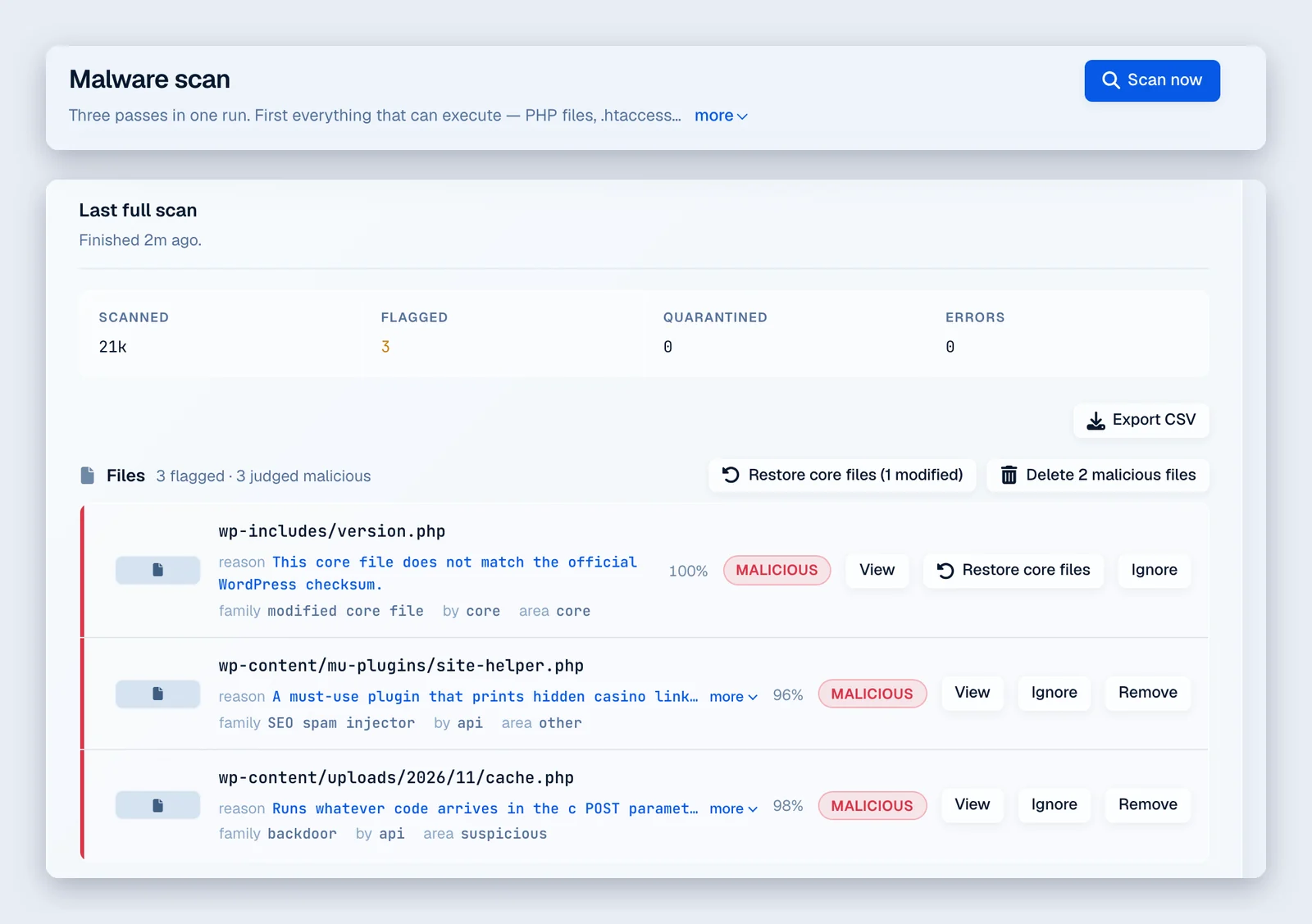
Real Must-Have Security screens from a demo site we infected on purpose: a backdoor in the uploads folder, a must-use plugin that hides spam links from the owner, and a modified core file.
Install it and run the scan
Install Must-Have Security on the client’s site and run a scan. Core files are checked against the official WordPress checksums; everything else is read as code. Here: three files flagged.
Click Scan now
See exactly what’s wrong
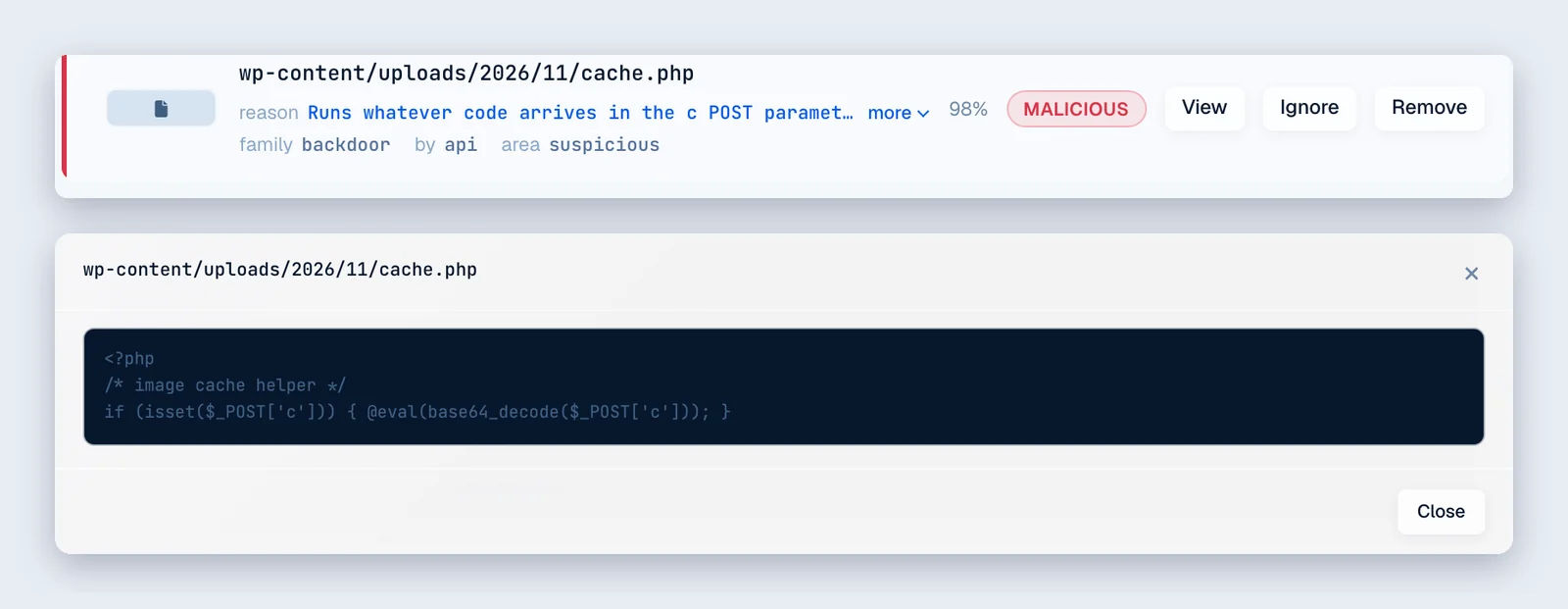
Every finding comes with its evidence. This “image cache helper” in the uploads folder runs whatever code arrives in a POST request.
Click View
Clean it up
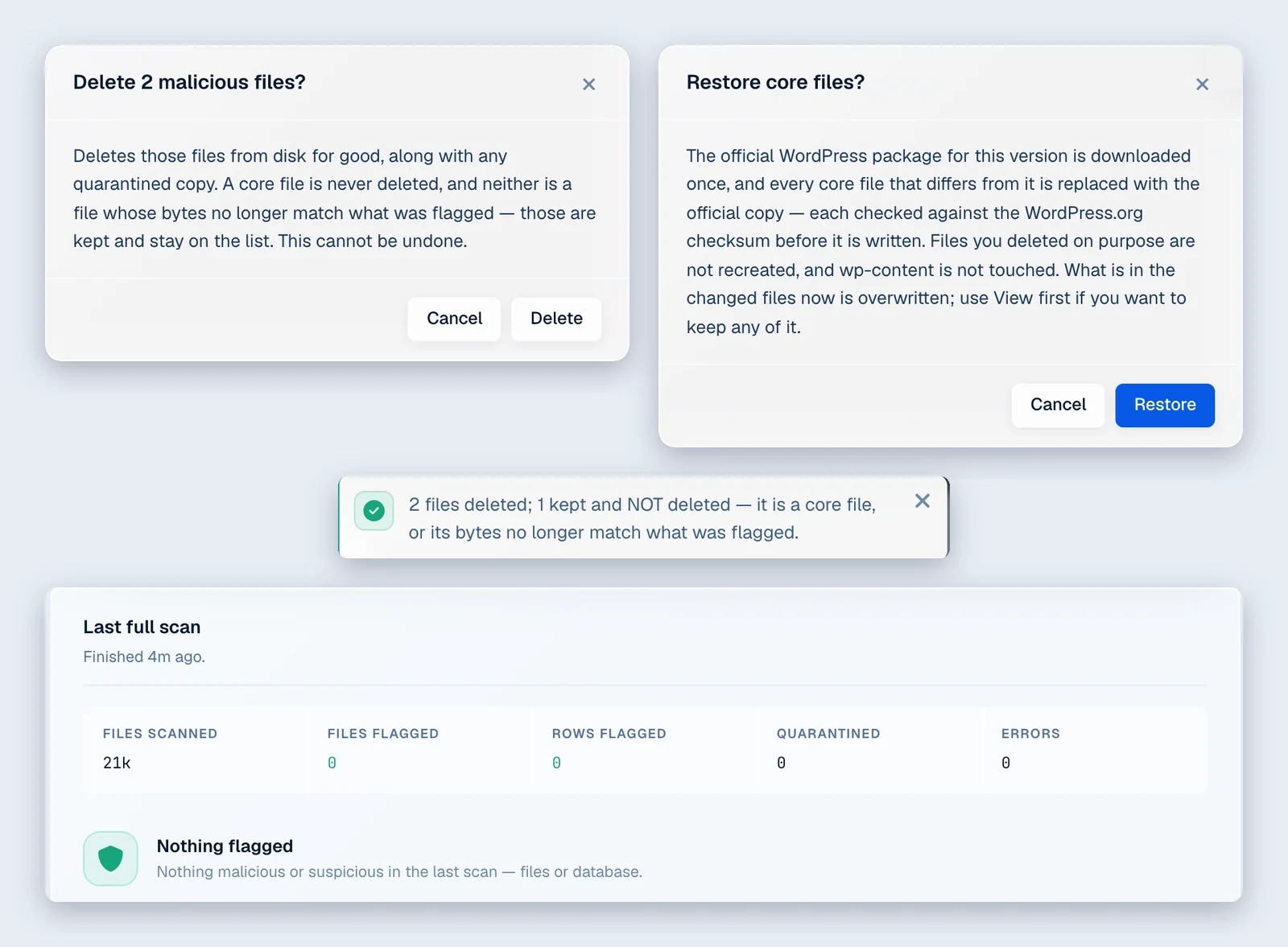
Delete the malware, then restore the modified core file from the official WordPress package. You confirm each step, and the scan comes back clean.
Click Delete 2 malicious files then Restore core files
Lock the door
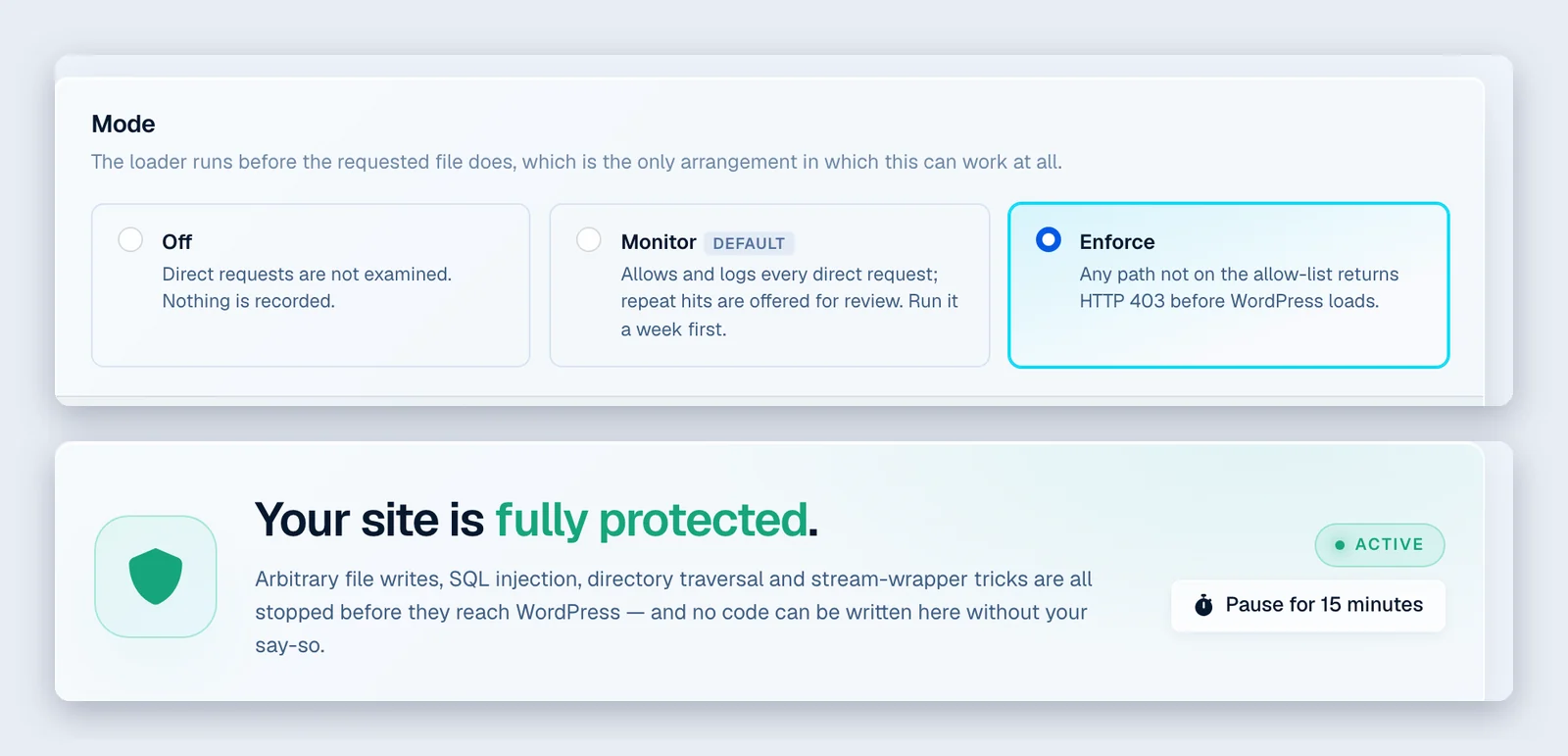
Code control is on from the first request: executable code needs a permission you open yourself. Refuse PHP files nobody should call, switch on the two hardening options, and the dashboard says fully protected.
Set Direct requests to Enforce
Watch it refuse the comeback
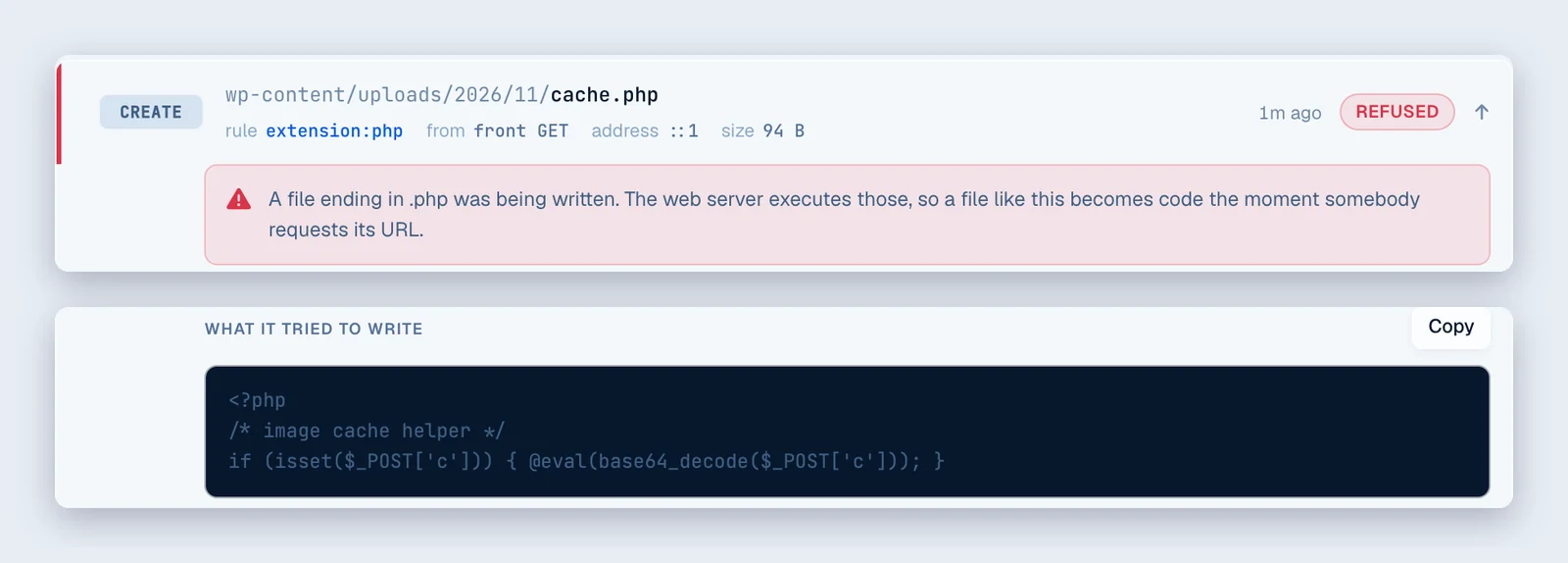
Attackers keep copies and try to write the backdoor back. The same file, written again from the front end: refused at the write, logged with the code it tried to write.
Nothing to click: it refuses on its own
Then: change the admin passwords and update the plugins. If you get stuck, support is included in every plan.
Get Must-Have Security for $29.99Black Friday deal
Don’t miss it. Two minutes gets you 70%.
Half price for everyone. Watch the film on why Must-Have Security is different and it’s 60% off; answer three quick questions as well and it’s 70%, with lifetime and the 25 and 100-site licenses on top.
Every plan
One license for your client list. Lifetime only until 1 December.
25 or 100 sites on one license, yearly or paid once. The 25 and 100-site plans and lifetime open with the video; lifetime for 25 and 100 sites with the three questions.
Before you buy
Can I use it on my clients’ sites?
Yes. A license covers a number of sites: 1, 5, 25 or 100. Install it on every client site you look after, up to the number on your license.
Will it break plugin and theme updates?
No. When you update a plugin, theme or core, you open a scoped write permission from the screen you’re on, confirmed with a passkey, an authenticator app or your password. It covers exactly that path, for a few minutes.
Can it lock me out of a client’s site?
It is engineered specifically not to. An address a trusted admin has used is never refused, no firewall rule can block the admin or the login screen, and if the engine itself ever fails, it switches itself off, lets the site boot and e-mails every trusted administrator.
Does it slow the site down?
Each file operation costs about 2–45 microseconds on our test hosts, so a few milliseconds on a full admin request. Hosts differ, so treat these as our measurements, not a promise for yours.
Does protection stop if a subscription lapses?
No. The engine keeps enforcing, so your client’s security is never held hostage. An active subscription is required for updates and support.
Is there a money-back guarantee?
Yes, 14 days. Try it on a real site. Not for you? Every cent back, no questions asked.
Your next client already has a WordPress site.
Up to 70% off the first year until 1 December, renewals stay discounted for as long as you keep the plan, and lifetime goes when the clock stops.