
Every week we go through the WordPress vulnerabilities that received a CVE the week before and sort out which ones deserve your attention first. This report covers October 12 to 18, 2026.
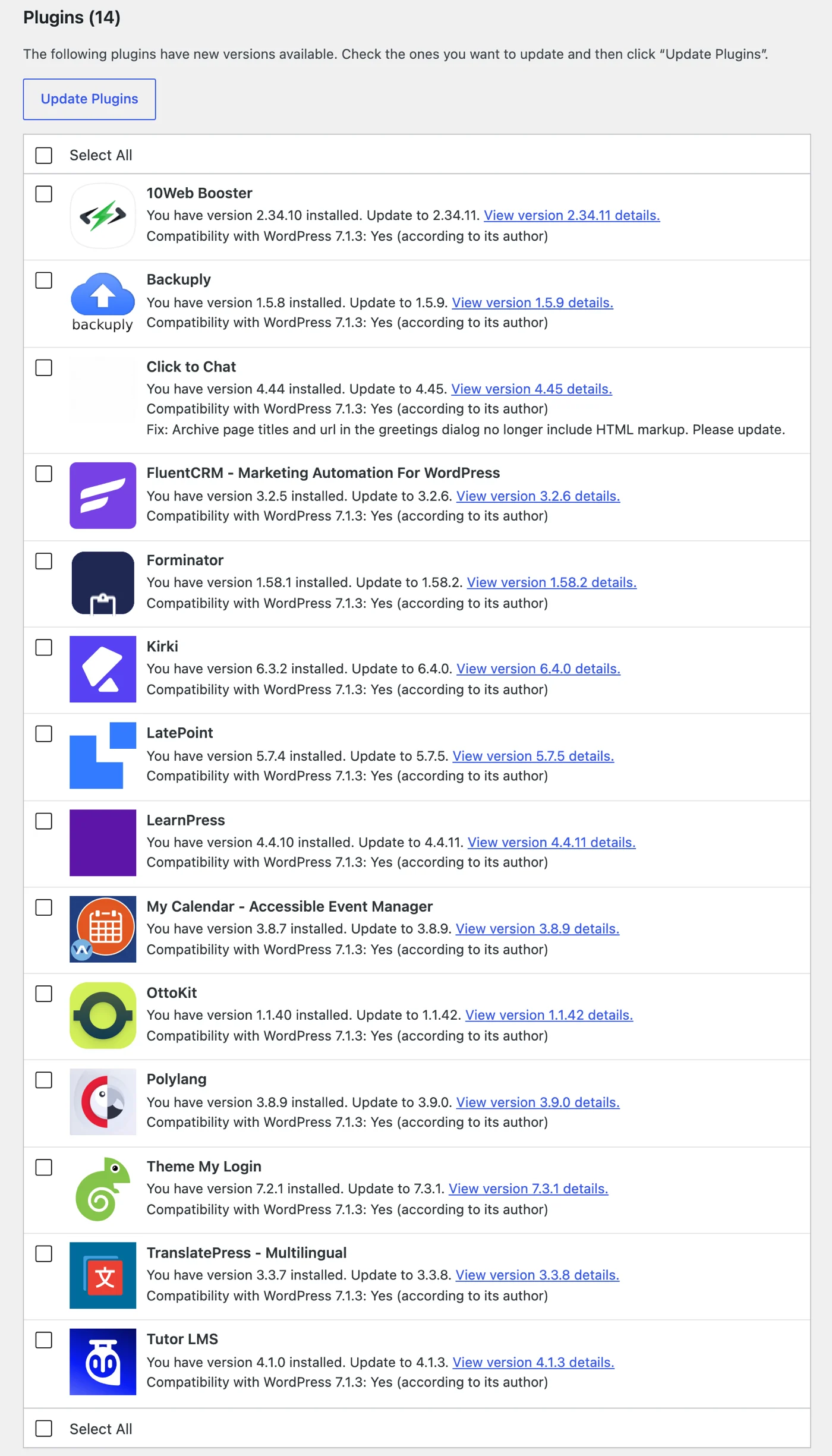
The short version: if a site installed or updated Rank Math SEO PRO on October 15 or 16, start with the first section below, because that site may have received malware through the official update. After that, update LatePoint, OttoKit, FluentCRM and My Calendar today: each has a bug that needs no login, and three of them can end with administrator access. The fourth hands over any customer’s account. Patchstack marks the OttoKit bug as exploited, and the fixed version is 1.1.42, not the 1.1.41 its advisory names. LatePoint, Forminator and Kirki are back for another week, and last week’s versions are no longer enough.
First: the poisoned Rank Math SEO PRO release
The most urgent item this week is not a coding mistake. Between October 15 at 20:02 UTC and October 16 at 07:12 UTC, some of the Rank Math SEO PRO 3.0.123 packages handed out through Rank Math’s own downloads and updates contained malware. Rank Math pulled them and released 3.0.124 as the clean replacement. The CVE for it (CVE-2026-111862, rated 9.8) came out on Monday, October 19, so it belongs to next week’s numbers, but it can’t wait until then.
Only packages downloaded or updated during those eleven hours are affected. The free Rank Math SEO from WordPress.org is not, and neither is a site that installed 3.0.123 when it first came out on October 7. The version number alone proves nothing; what matters is when the package arrived. If you aren’t sure, check the plugin folder’s file dates or your update log.
If the plugin was installed and activated in that window, Rank Math’s advice is to treat the site as compromised. According to the vendor and the CVE record, the malware sets up persistent access, contacts an outside server, recreates hidden backdoors on ordinary page visits and can expose WordPress, database and API credentials. That is why updating to 3.0.124 is not enough: the update replaces the plugin folder, not what the malware left elsewhere. Rank Math’s incident notice lists the clean-up, in short:
- Restore a backup made before October 15, 20:02 UTC, if you have one.
- Otherwise delete the whole
rank-math-profolder. Deactivating the plugin is not enough. - Look for what the malware leaves behind: the
wp_optionsrows_uf6qdn2hmm,t8krdk990phband_np5pvf754c; PHP backdoors inmu-pluginsand in the include folders of other plugins and the theme; administrator accounts you didn’t create, such aswpsupport_usernames or@wp-mail.netaddresses; a fake core file atwp-includes/class-wp-cache-util.php;.htaccessrules that run.cachefiles as PHP; and the marker#ms6v46in the server’s crontab. - Change every password and secret: WordPress users, the database, the salts in
wp-config.php, API keys, hosting and SSH logins. - Install 3.0.124 only from your Rank Math account. Rank Math adds that it never sends login or download links by email.
If the package was downloaded or installed but never activated, delete it, install 3.0.124 from your account and run a scan.
It is the third compromised release this year to reach sites through a vendor’s own downloads and updates, after Smart Slider 3 Pro in April and ShapedPlugin’s Pro plugins in June. Every check a site normally relies on says yes to such an update, because it comes from the vendor and an administrator asked for it. We explained what that means for defence, and how a site can spot a poisoned release about a minute after it lands, in WordPress supply chain attacks: how to catch a poisoned plugin update in the first minute.
The week in numbers
458 new CVEs were published for WordPress plugins and themes last week. That is well below last week’s record of 750, but still more than twice a typical week: the median since January 2024 is 192, and 252 in 2026.
- Severity: 32 critical, 147 high, 270 medium and 9 low (CVSS 3.1 base score from the record). Nearly all of the critical ones need no login.
- Affected: 328 components: 327 plugins and one theme. No CVE for WordPress core, and no core release either; 7.1.3 is still current.
- Bug types: cross-site scripting leads with 152 records (33%), followed by broken access control (118), information disclosure (38) and SQL injection (34).
- Sources: Wordfence 196, Patchstack 155, WPScan 105, VulnCheck 1, MITRE 1.
- Fixes: of the 404 records for plugins hosted on WordPress.org, 375 already have a newer release than the last affected version, 22 belong to plugins that WordPress.org has closed, and 7 have no newer release yet. 54 records are for premium plugins and themes, where the version history isn’t public.
One pattern stands out: 17 records describe a script that arrives through a blog comment, after 13 and 9 in the two weeks before. We cover them together under Depends on your setup.
Every record, with search and filters, is in our WordPress vulnerability database, which updates daily from the CVE List.
How we rank them
The CVSS score is a starting point, not the answer. We look at who can reach the bug, what has to be switched on for it to work, what the attacker gets and how many sites run the plugin. None of this changes what to do: every fix below should go in as soon as you can. The ranking tells you where to start, and which sites to look at more closely if they ran an old version for a while.
- Highest risk: anyone can reach the bug, the impact is serious and nothing special has to be switched on.
- High risk: it takes an account, an admin action or an unusual trigger, or the impact is narrower.
- Depends on your setup: only exploitable with a specific option, add-on or site type. If your site matches, treat it as highest risk.
Click to Chat is this week’s example. Its record scores 9.1 and needs no login, which reads like an emergency on a plugin with 600,000 installs. Read on and the bug only works when the greetings dialog is switched on and its text uses the {url} variable, neither of which is the default. Update it on every site anyway: keeping a site safe shouldn’t depend on knowing which conditions apply.
This week’s shortlist
Update everything on this list now. The groups only show where the risk is highest, so you know where to start.
| Plugin | Bug | Login needed | Fixed in |
|---|---|---|---|
| Rank Math SEO PROPremium, updated October 15 or 16 | Malware in the release | No | 3.0.124 |
| LatePoint100,000+ installs | Customer account takeoverand 1 more | No | 5.7.5 |
| OttoKit90,000+ installs | Privilege escalationreported as exploited | No | 1.1.42 |
| FluentCRM80,000+ installs | Privilege escalationand 1 more | No | 3.2.6 |
| My Calendar20,000+ installs | Admin account takeover | No | 3.8.8 |
| Abandoned Cart Pro for WooCommercePremium plugin | Login as any customerand 2 more | No | 10.8.1 |
| The GridPremium plugin | Remote code executionreported as exploited | No | 2.8.2 |
| JTL-Connector for WooCommerceClosed on WordPress.org | Remote code executionand 1 more | No | 2.4.5manual install |
| Forminator600,000+ installs | Shortcode executionand 2 more | Noblock themes | 1.58.2 |
| Tutor LMS100,000+ installs | Page overwriteand 4 more | No | 4.1.1 |
| LearnPress70,000+ installs | PHP object injectionand 1 more | No | 4.4.11 |
| Gravity FormsPremium plugin | PHP object injection | Nohard to trigger | 3.1.1 |
| Backuply600,000+ installs | Privilege escalation | Subscriberan admin has to restore a backup | 1.5.9 |
| Search Regex100,000+ installs | Code execution | Subscriberan admin has to run a replace | 3.5.1 |
| Script in a comment9 plugins, see below | Stored cross-site scripting | Nothe comment has to be approved | See below |
| Click to Chat600,000+ installs | Shortcode execution | Nogreetings dialog using {url} | 4.45 |
| 10Web Booster60,000+ installs | File upload to code execution | Noconnected to a 10Web account | 2.34.11 |
| Kirki500,000+ installs | User data exposureand 1 more | NoKirki templates showing user data | 6.4.0 |
| Theme My Login50,000+ installs | Password overwrite | Nomultisite only | 7.2.2 |
| Polylang900,000+ installs | PHP object injection | Editor | 3.8.11 |
Highest risk
LatePoint 5.7.4 and older: a login code that could be guessed
100,000+ installs · CVSS 9.1 · CVE-2026-110653 (Wordfence) · fixed in 5.7.5
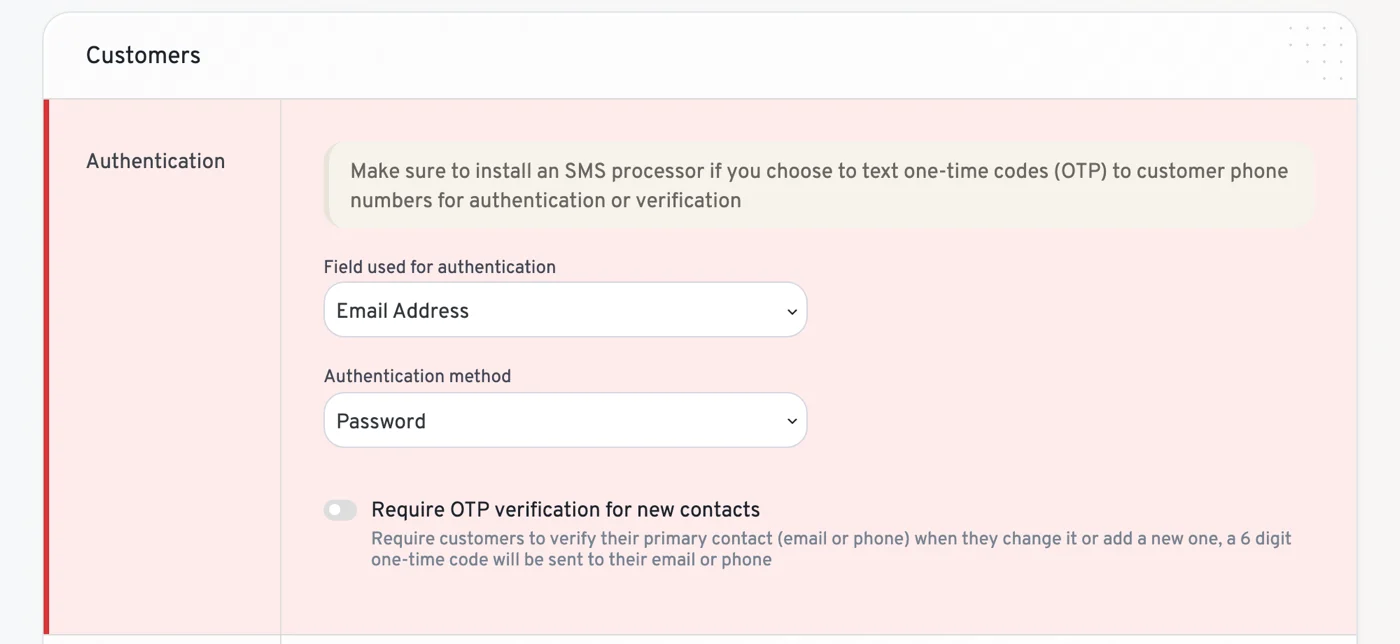
LatePoint can log customers in with a six-digit one-time code. The counter that limits wrong guesses could be raced: requests sent at the same moment slipped past it, so an attacker got far more tries than the limit allows. All they need is the customer’s email address or phone number. What they get is that customer’s account, with their bookings and personal details. If “Use WordPress users as customers” is switched on, they are logged into the linked WordPress account as well; LatePoint refuses this for privileged roles.
The authentication setting doesn’t protect you. Reading the 5.7.4 code, the one-time code login answers even when “Authentication method” is set to Password, which is the default.
This is LatePoint’s third week in our report, and last week’s 5.7.4 is no longer enough. 5.7.5 came out on October 16 (“Addressed security bugs. Props to WPScan and WordFence for reporting them.”) and also fixes a smaller leak of customer contact details on sites where customer login is disabled (CVE-2026-111602).
Update now. 5.7.5 is outside the affected range of every LatePoint record so far.
OttoKit 1.1.41 and older: reported as exploited, and the advisory names the wrong fix
90,000+ installs · CVSS 9.8 · CVE-2026-110372 (Patchstack) · fixed in 1.1.42
OttoKit, formerly SureTriggers, connects a WordPress site to automation workflows. Patchstack lists a privilege escalation that needs no login and flags it as known to be exploited. Its advisory says 1.1.41 fixes it, but 1.1.41 came out on October 8, before the report reached Patchstack, and contains the old code. The fix is in 1.1.42 from October 15, whose changelog reads “This update addressed a security bug. Props to Peter Tang and Patchstack for privately reporting it to our team.”
The change is in how the plugin checks its connection key. Our reading of the code, not the advisory’s: the exposed sites are the ones where someone started connecting to an OttoKit account and the connection never went through, which leaves the plugin with a weak stored key. OttoKit has a history here: two of its bugs were exploited in 2025 (CVE-2025-3102 and CVE-2025-27007).
Update now, and check that the Plugins screen says 1.1.42. If the site ever showed OttoKit as “not connected”, look through the administrator list as well.
FluentCRM 3.2.5 and older: privilege escalation without an account
80,000+ installs · CVSS 9.8 · CVE-2026-109694 (Patchstack) · fixed in 3.2.6
Patchstack lists a privilege escalation in the email marketing plugin that anyone can reach, and a second one that needs a Contributor account (CVE-2026-109693, 8.8). The advisories give no details. The 3.2.6 changelog (October 12) has one line: “Safer smartcodes and stronger permissions for WordPress-user automation actions.” The code matches it: smartcodes, FluentCRM’s merge tags, among them password reset links, can no longer be used outside a contact’s own email, and the automation steps that create or change WordPress users now check permissions.
Update now. A CRM holds the whole subscriber list, so a takeover here is also a data breach.
My Calendar 3.8.7 and older: the calendar page is all it takes
20,000+ installs · CVSS 9.8 · CVE-2026-104798 (Wordfence) · fixed in 3.8.8
A smaller plugin, but nothing stands in front of this bug. Through the calendar’s own navigation, an anonymous visitor could overwrite the login details of the user with ID 1, on most sites the first administrator. All it needs is a page that shows the calendar, and My Calendar publishes one on its own when it’s activated.
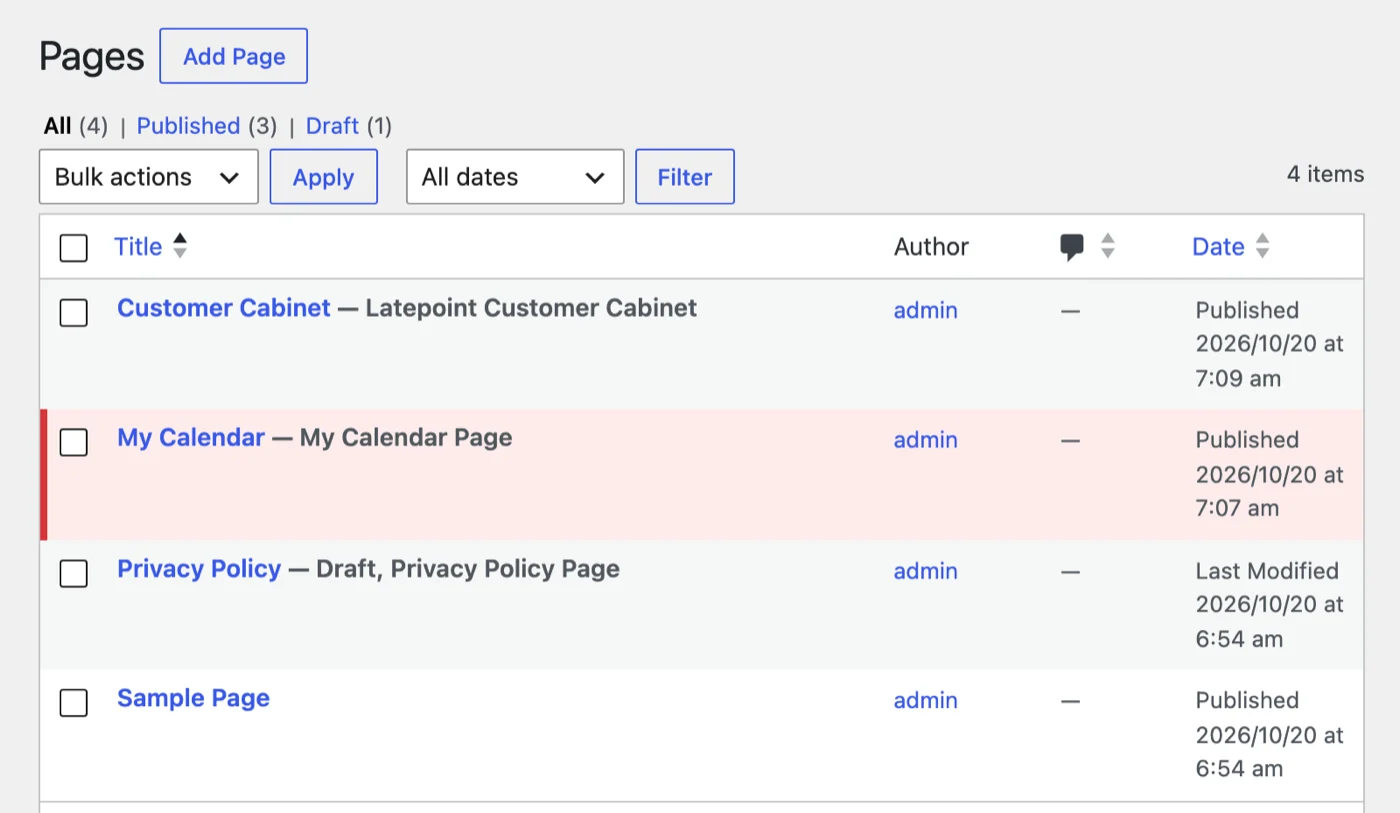
3.8.8 came out on October 14 with the changelog line “Fixes a severe unauthenticated privilege escalation flaw.” The developer released fixes for older branches the same day: 3.7.18, 3.6.18, 3.5.22 and 3.4.25.
Update now, then make sure user 1 still has your email address and that you can log in with your own password.
Abandoned Cart Pro for WooCommerce 10.8.0 and older: logging in as anyone with a cart
Premium · CVSS 9.8 · CVE-2026-97657 and CVE-2026-97668 (Wordfence) · fixed in 10.8.1
Abandoned cart emails contain a recovery link that logs the customer straight back in. According to Wordfence, anyone holding one genuine link, which they get by abandoning a cart themselves, could forge links that log in as any user who ever left a cart behind, administrators included. Automatic login is on by default and is switched back on when the plugin is upgraded. A second bug allows SQL injection without login through the guest cart (9.8), and a third through the link’s validation token (CVE-2026-102251, 7.5).
Tyche Softwares fixed all three in 10.8.1 on October 8, its third security release in a row. The free Abandoned Cart Lite has no record this week, but its 6.9.0 (October 15) hardens the same recovery link check.
Update now through your Tyche license, and update the Lite version too if you run it.
The Grid 2.8.1 and older: code execution, reported as exploited
Premium · CVSS 10 · CVE-2026-94169 (Patchstack) · fixed in 2.8.2
The Grid is a grid and gallery plugin sold on CodeCanyon and aimed at theme developers, so it often arrives bundled with a theme. Patchstack lists remote code execution that needs no login, flags it as known to be exploited, and names 2.8.2 as the fix. It was reported on September 2 and published on October 14.
Update now. The Grid only updates itself after it is registered with an Envato token, so bundled copies usually sit on whatever version the theme shipped. Check the version on the Plugins screen, and if it came with your theme, get 2.8.2 from the theme author or remove it.
JTL-Connector for WooCommerce 2.4.3 and older: the fix won’t show up in Updates
Closed on WordPress.org · CVSS 9.8 · CVE-2026-87855 (Wordfence) · fixed in 2.4.5
JTL-Connector links WooCommerce to JTL-Wawi, the merchandise management system many German-speaking shops use. An anonymous visitor could upload a file through its image sync and get code running on the server; a second bug allows SQL injection without login (CVE-2026-78193, 7.5). WordPress.org closed the plugin on October 7 pending a review, so the Updates screen offers nothing. The developer still committed 2.4.5 on October 15, with both fixes in the changelog.
Update now, by hand: the 2.4.5 package can still be downloaded from downloads.wordpress.org/plugin/woo-jtl-connector.2.4.5.zip, and installed through Plugins → Add New Plugin → Upload Plugin. If the shop no longer syncs with JTL-Wawi, remove the plugin.
High risk
Forminator 1.58.1 and older: back for a second week
600,000+ installs · CVSS 6.5 · CVE-2026-103911 (Wordfence) · fixed in 1.58.2
Last week 1.58.0 covered six Forminator bugs. Now 1.58.2 is needed. Through the site search or an anonymous comment, a visitor could make the site run any shortcode, on every site with a block theme. No Forminator form has to be published. The score is only medium because a shortcode is as dangerous as the plugin that registered it: most are harmless, some show restricted content or account details. 1.58.2 (October 14) limits block rendering to Forminator’s own shortcodes.
Two more Forminator records came out this week. A shortcode bug in quiz notifications (CVE-2026-101335) was already fixed in 1.58.0, despite a record that says otherwise, and a minor access control bug (CVE-2026-108486) in 1.58.1.
Update now, to 1.58.2.
Tutor LMS before 4.1.1: anyone could republish Tutor’s own pages
100,000+ installs · CVSS 7.5 · CVE-2026-96537 (WPScan) · fixed in 4.1.1
Tutor has a tool that regenerates the pages it needs: the student dashboard, instructor and student registration, cart and checkout. That tool had no permission check, so an anonymous visitor could force those pages to publish, overwrite their content and repoint the settings that use them. It’s not a takeover, but a broken checkout or dashboard on a course site costs sales, and WPScan plans to publish a proof of concept on November 13. Four smaller Tutor bugs from this week are fixed in the same release.
Update now, straight to 4.1.3, whose changelog (October 15) mentions one more security fix that has no public record yet.
LearnPress 4.4.10 and older: object injection at checkout
70,000+ installs · CVSS 9.8 · CVE-2026-104736 (Wordfence) · fixed in 4.4.11
An anonymous visitor could get untrusted data turned into a PHP object through the checkout email field, whether or not guest checkout is enabled. As with every object injection, what happens next depends on code elsewhere on the site, from nothing at all to a takeover. The same release fixes a stored XSS through the quantity and order comment fields (CVE-2026-109208, 7.2), which needs no login when guest checkout is on and a Subscriber account when it’s off. 4.4.11 came out on October 16.
Update now.
Gravity Forms before 3.1.1: object injection, fixed six weeks ago
Premium · CVSS 8.1 · CVE-2026-97296 (Patchstack) · fixed in 3.1.1
Patchstack lists PHP object injection that needs no login but is hard to trigger, and gives no details. The fix shipped in 3.1.1 on September 3, listed in the changelog only as “Added security enhancements”, so most sites with automatic updates have it already. The current release is 3.1.3.
Update now if Forms → System Status shows anything below 3.1.1, for example on a site whose license has expired.
Backuply 1.5.8 and older: planted by a subscriber, triggered by a restore
600,000+ installs · CVSS 8.0 · CVE-2026-93953 (Wordfence) · fixed in 1.5.9
A subscriber could hide SQL in their own profile. Nothing happens until an administrator restores a backup taken after that, but then the injected SQL switches on open registration and makes administrator the default role, so the next account anyone registers is an admin. Backuply fixed the restore process in 1.5.9 on October 1, two weeks before the CVE appeared.
Update now. If you restored a backup with an older version on a site where people can register, check Settings → General: “Anyone can register” and “New User Default Role” should be what you set, and the administrator list should hold no strangers.
Search Regex 3.5 and older: code execution through a search and replace
100,000+ installs · CVSS 8.0 · CVE-2026-104932 (Wordfence) · fixed in 3.5.1
A subscriber could store data in their user meta that turns into running code when an administrator later runs a replace over user meta that matches it. Without that admin step nothing happens. The record names no fixed version, but 3.5.1 (October 6) fixes it: “Fix security issue with serialized user meta”. Older 3.4 releases contain the same code, so treat everything below 3.5.1 as affected.
Update now. Like String Locator last week, Search Regex tends to stay installed long after the one job it was needed for. If nobody uses it, delete it.
Depends on your setup
These need a particular setup before they can be exploited. Update them now all the same. The condition tells you whether a site that ran an old version deserves a closer look.
Script in a comment: 17 records this week
WordPress cleans a comment before it displays it. The trouble starts afterwards. Many plugins rewrite the finished page before it goes out: cookie banners that block scripts, translation plugins, script delayers, security plugins that rename paths. They parse the page’s HTML again, and a quirk in that second pass can turn harmless-looking comment text back into a working script. Two others, Colibri and SureCart, made the same mistake differently, by allowing extra HTML in all content, comments included. Almost all of this week’s records come from Wordfence, and they keep coming: 13 the week before last, 9 last week, 17 this week.
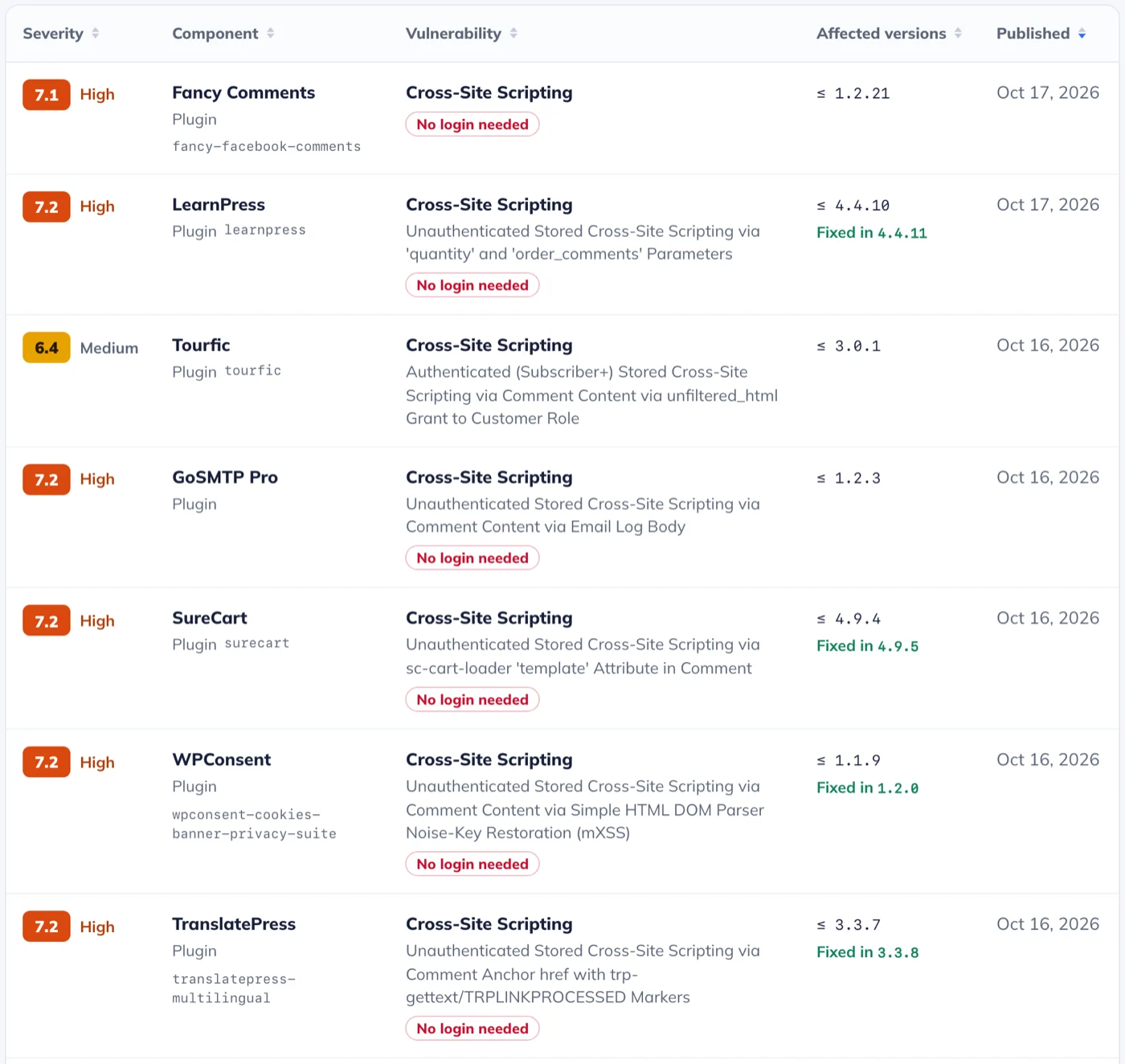
For most of them, the comment has to be approved and on display for the script to run. WordPress holds a first comment for moderation by default, but once someone has one approved comment, their next ones appear right away. That default is the real condition for most of the list below.
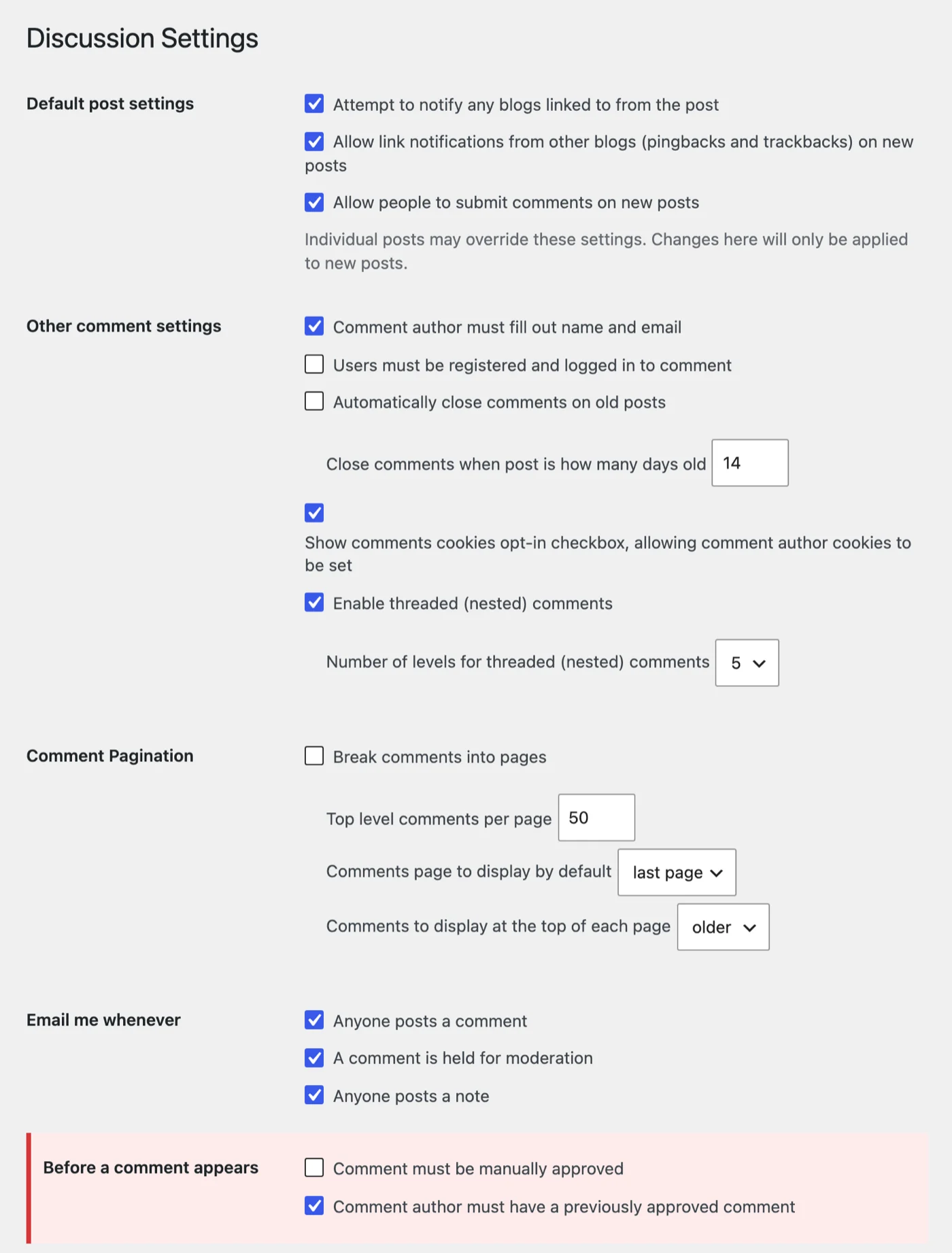
- TranslatePress 3.3.7 and older (400,000+): with a second language and comments that go live without moderation. Fixed in 3.3.8.
- WPConsent 1.1.9 and older (200,000+): with Script Blocking on, which the setup wizard pre-checks. Fixed in 1.2.0.
- Complianz 7.5.5 and older (1,000,000+): only when the YotuWP YouTube gallery plugin is active as well. Fixed in 7.5.6.
- Hide My WP Ghost 7.0.12 and older (100,000+): through an option that is on by default; a visitor has to click the injected link. Go to 7.0.14: the vendor later patched 7.0.13 in place, so an early 7.0.13 is still affected.
- Colibri Page Builder 1.0.390 and older (80,000+) and Flying Scripts 1.2.4 and older (30,000+): no setting needed, only the approved comment. Fixed in 1.0.392 and 1.2.5.
- SureCart 4.9.4 and older (80,000+): the comment has to be on a page that loads SureCart elements. Fixed in 4.9.5.
- SiteOrigin CSS 1.6.7 and older (100,000+): the script runs in an administrator’s browser when they open the page in the CSS inspector. Fixed in 1.6.8.
- GoSMTP Pro 1.2.3 and older (premium): with email logging on, the script runs when an administrator opens the email log, and the comment probably doesn’t even need approval, since WordPress emails new comments to the admin. Fixed in 1.2.4. The free GoSMTP is not affected.
Update now. If a site doesn’t need comments, close them. If it does, “Comment must be manually approved” gives you a look at every comment before it goes live.
Click to Chat 4.44 and older: only with the greetings dialog and {url}
600,000+ installs · CVSS 9.1 · CVE-2026-92097 (Wordfence) · fixed in 4.45
On archive pages (categories, tags, authors, dates), an anonymous visitor could make the site run any shortcode through the page address. It takes two settings that are off by default: the greetings dialog has to be switched on (Click to Chat → Greetings), and its Main Content has to use the {url} variable. The default text only uses {title}. The fix shipped in 4.45 on September 28, more than two weeks before the CVE: “Archive page titles and url in the greetings dialog and pre-filled message no longer include HTML markup.”
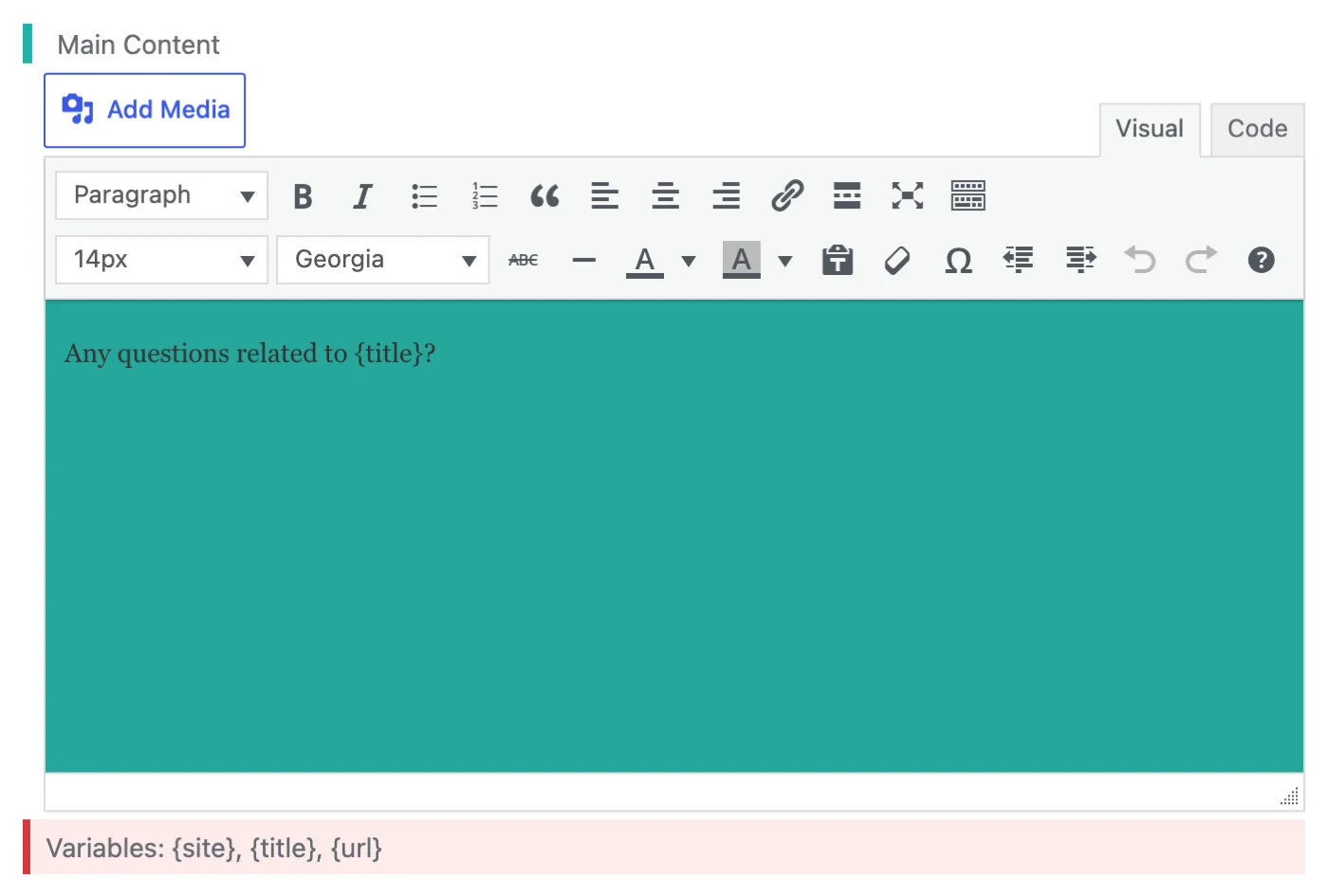
Update now. If a site used {url} in the greetings dialog, it was exposed for as long as it ran 4.44 or older.
10Web Booster 2.34.10 and older: code execution on sites connected to 10Web
60,000+ installs · CVSS 9.8 · CVE-2026-108587 (Wordfence) · fixed in 2.34.11
An anonymous file upload that can end in code execution, but only on sites connected to a 10Web account, and only while a short-lived token from a recently paused bulk image optimization is valid. A freshly installed, unconnected plugin is not exposed. 2.34.11 came out on October 13 (“Security hardening in the image optimization queue and REST API”); a smaller cache path bug (CVE-2026-103896) was fixed in 2.34.8.
Update now. If the site is connected to 10Web, treat it as highest risk.
Kirki 6.3.2 and older: user details through templates, third week running
500,000+ installs · CVSS 7.5 · CVE-2026-107762 (Wordfence) · fixed in 6.4.0
On sites that publish a Kirki template showing user data, an anonymous visitor could read any user’s email address, names, registration date and profile fields. A second record covers object injection through template import, available to administrators and, by default, editors (CVE-2026-104734). 6.4.0 (October 13) fixes both, although its changelog doesn’t say so.
Update now. Last week’s advice was 6.3.2, which is no longer enough.
Theme My Login 7.2.1 and older: password overwrite on multisite
50,000+ installs · CVSS 9.8 · CVE-2026-89079 (Wordfence) · fixed in 7.2.2
A lost password request could overwrite another account’s password, an admin’s included, but the vulnerable code only runs on multisite networks with “Allow users to set their own password” switched on in the network’s Theme My Login settings, which is off by default. The fix has been out since September 15.
Update now, to the current 7.3.1, which adds more multisite hardening.
Polylang 3.8.10 and older: object injection for editors
900,000+ installs · CVSS 7.2 · CVE-2026-97278 (Patchstack) · fixed in 3.8.11
An editor could get untrusted data unserialized. Patchstack names 3.8.10 as the fix, but 3.8.10 only filtered one spot; the 3.8.11 changelog (October 12) says “Security: Fix deserialization of untrusted data”. It matters on sites where editors are not fully trusted, such as agencies with client editors.
Update now, to 3.8.11 or the current 3.9.0.
Back from last week
Several plugins from last week’s report got new records this week. If you followed last week’s advice:
- LatePoint, Forminator and Kirki: last week’s versions aren’t enough anymore. See above.
- Amelia 2.4.11 also covers this week’s SQL injection without login (CVE-2026-108497, 9.3). Nothing more to do.
- The Events Calendar 6.18.2 fixes a Contributor-level XSS in its Elementor widgets (CVE-2026-110903). It only matters with Elementor, but update anyway.
- Rank Math SEO, the free plugin: 1.0.280 also covers a new record that lets anyone delete stored SEO analyzer results (CVE-2026-104751). Nothing more to do. This is unrelated to the PRO incident above.
- WP 2FA 4.2.0 also covers an administrator-level bug (CVE-2026-108066). Nothing more to do.
Also on the list
Smaller install bases or narrower conditions, but if you run one of these, update it too.
- Link Whisper Free 0.9.7 and older (30,000+): SQL injection without login (CVE-2026-109688, 9.3), plus three bugs that need a Contributor or Editor account. Fixed in 0.9.8.
- MailOptin 1.2.78.6 and older (10,000+): anyone can overwrite any account’s password when an opt-in form uses the WordPress User Registration integration (CVE-2026-109515, 9.8). Fixed in 1.2.78.7.
- Frontend Admin by DynamiApps 3.29.13 and older (8,000+): privilege escalation without login (CVE-2026-109892, 9.8), at least the sixth such record since late 2025. Fixed in 3.30.0. Note that 3.30.1 no longer bundles ACF: install ACF separately first, or the forms disappear.
- User Registration & Membership 5.2.8 and older (50,000+): 11 records, among them stored XSS without login through registration form checkboxes (CVE-2026-96660). All fixed in 5.3.0.
- Profile Builder 4.0.3 and older (40,000+): an administrator account without login, but only with an old field named “role” and Email Confirmation switched on (CVE-2026-109447). Fixed in 4.0.4; 4.0.5 adds four more security fixes.
- Modula 3.0.11 and older (100,000+): the passwords of password-protected galleries, a Premium add-on, were readable without login through the REST API (CVE-2026-107659). Fixed in 3.0.12; change those gallery passwords.
- Salon Booking System (2,000+): nine records, the worst a cross-site request forgery that creates an administrator when a logged-in admin opens a crafted link. 10.31.11 covers all nine.
- Meow Lightbox 5.6.2 and Gallery Custom Links 2.3.3: the comment script problem from above, but the attacker needs a Subscriber account. Fixed in 5.6.3 and 2.3.4.
What to do now
- If a site installed or updated Rank Math SEO PRO on October 15 or 16, follow the steps in the first section before anything else.
- Open Dashboard → Updates and install everything, starting with LatePoint, OttoKit, FluentCRM and My Calendar. For OttoKit, make sure the result is 1.1.42.
- Update the premium plugins through their own licenses: Abandoned Cart Pro to 10.8.1, The Grid to 2.8.2, Gravity Forms to at least 3.1.1.
- If a shop runs JTL-Connector, upload 2.4.5 by hand.
- On sites with open comments, decide whether comments need approval, and close them where nobody uses them.
Where Must-Have Security fits
Updates close the holes on this list, and next week brings a new one. Several of this week’s worst bugs end with administrator access: OttoKit, FluentCRM, My Calendar, Abandoned Cart Pro. The Grid and JTL-Connector go straight to running code. And the poisoned Rank Math release did what attackers do next: according to the CVE record, it recreates hidden backdoors on ordinary page visits. All of that means writing executable code to the server.
Must-Have Security puts a separate confirmation in front of exactly that step. On a protected site, being an administrator isn’t enough to write PHP files: it takes a passkey or authenticator code, and that factor isn’t stored in the database. Writes that come from visitor requests, the way that Rank Math malware rebuilds its backdoors, are refused and logged. It makes it much harder for an attacker to run their own code; it doesn’t replace updates.
How this report is made
We take every CVE record for WordPress core, plugins and themes published in the CVE List between Monday and Sunday (UTC), as collected in our database. Install counts are from WordPress.org on the day the report comes out. Fixed versions come from the advisory, the plugin’s changelog or the code change itself, and where they disagree, we go with the code. The screenshots were taken on a local test site running the affected versions. The ratings are ours.
The next report covers October 19 to 25 and comes out on Monday, October 26.