

Every week we go through the WordPress vulnerabilities that received a CVE the week before and sort out which ones deserve your attention first. This report covers November 9 to 15, 2026.
The short version: no plugin with millions of installs is on fire this week, but eight bugs carry Patchstack’s “known to be exploited” badge. The widest is in AI Engine (90,000+ installs): a chatbot or form that accepts file uploads let visitors store a web page on your site, and the first fix wasn’t enough, so go to 3.9.4. The premium Ninja Forms File Uploads add-on let a visitor delete files such as wp-config.php until 3.3.37. And several versions we recommended in earlier reports are out of date already: Widget Options needs 4.2.7 because last month’s fix was incomplete, Optimole needs 4.2.20, Contact Form 7 6.2.5 and WP Data Access 5.5.93. If your shop uses the WooCommerce Stripe Gateway, look in the admin inbox for an email about customer passwords.
The week in numbers
446 new CVEs were published for WordPress plugins and themes last week, down from 459 the week before. It is the ninth-biggest week of 2026. The median since January 2024 is about 195 a week, and 263 in 2026.
- Severity: 34 critical, 155 high, 212 medium and 16 low (CVSS 3.1 base score from the record). 29 records from WPScan have no score yet. 31 of the 34 critical ones need no login.
- Affected: 328 components, almost all of them plugins. No WordPress core record this week; 7.1.4 is still the current release.
- Bug types: cross-site scripting leads with 143 records (32%), followed by broken access control (95), information disclosure (48), cross-site request forgery (27) and privilege escalation (24).
- Sources: Patchstack 218, WPScan 161, Wordfence 53, VulnCheck 12, others 2.
- Fixes: of the 330 records for plugins hosted on WordPress.org, 315 already have a newer release than the last affected version, 3 belong to plugins that WordPress.org has closed and 12 have no newer release. Two of those 12 are fixed after all, under different version numbers (Download Manager and Directorist). The other 116 records are for premium plugins and themes, or for plugins that had been closed before their CVE came out.
- No fix: 13 of the 34 critical records have no fixed version. Twelve of them are in plugins that WordPress.org has closed, most of them abandoned for years. More on those further down.
Every record, with search and filters, is in our WordPress vulnerability database, which updates daily from the CVE List.
How we rank them
The CVSS score is a starting point, not the answer. We look at who can reach the bug, what has to be switched on for it to work, what the attacker gets and how many sites run the plugin. None of this changes what to do: every fix below should go in as soon as you can. The ranking tells you where to start, and which sites to look at more closely if they ran an old version for a while.
- Highest risk: anyone can reach the bug, the impact is serious and nothing special has to be switched on, or it is already being exploited.
- High risk: it takes an account, an admin action or an unusual trigger, or the impact is narrower.
- Depends on your setup: only exploitable with a specific option, add-on or site type. If your site matches, treat it as highest risk.
TI WooCommerce Wishlist is this week’s example. “SQL injection without login, 8.6, 100,000+ installs” reads like an emergency. Read the record and the affected versions end at 2.0.6: the fix is 2.0.7 from October 2022, when the vulnerable file was removed from the plugin, and the CVE was only assigned now. A site that has updated this plugin at any point in the last four years is not affected, and a site that hasn’t has bigger problems than this one record. Forminator is the opposite case: its score is lower, but the conditions are ones a real membership site can meet without anyone noticing.
This week’s shortlist
Update everything on this list now. The groups only show where the risk is highest, so you know where to start.
| Plugin | Bug | Login needed | Fixed in |
|---|---|---|---|
| AI Engine90,000+ installs | Stored script through uploadsexploited | Noa chatbot or form with file upload | 3.9.43.9.2 is not enough |
| Ninja Forms File UploadsPremium add-on | File deletionexploited | Noa form with a file upload field | 3.3.37 |
| Estatik10,000+ installs | Local file inclusionexploited | No | 4.3.7 |
| Masterstudy themePremium, 22,000+ sales | Subscriber to administratorexploited | Subscriberopen on most course sites | 4.8.152since July |
| Widget Options100,000+ installs | Code injectionlast month’s fix was incomplete | Author | 4.2.7 |
| Optimole200,000+ installs | File deletionplanted through a comment | Noruns when an admin renames a media file | 4.2.204.2.19 is not enough |
| EWWW Image Optimizer1,000,000+ installs | Stored cross-site scripting | NoLazy Load, WebP or Easy IO on | 8.9.2 |
| WPIDE40,000+ installs | Forged request writes PHP | Noan admin opens a hostile page | 3.6.5 |
| Flatsome themePremium | Unpublished posts readableand 2 more | No | 3.20.13 |
| Document Library ProPremium | PHP object injection | No | 4.2.24.2.3 recommended |
| myCred10,000+ installs | SQL injectionand a data leak without login | Contributor | 4.0.3 per the advisorywe could not confirm it |
| Basel theme (Basel Post Types)Premium, 10,000+ sales | Login as any userexploited | Nosocial login configured | 1.19 per Patchstack |
| AutomatorWP WebhooksPremium add-on | Password reset for any userexploited | Noa webhook automation that updates users | 1.4.5 |
| Ultra Addons for Contact Form 760,000+ installs | File readexploited | NoPDF Generator on | 3.5.55same release as last week |
| Forminator600,000+ installs | Role without payment | Nopaid registration form, Stripe disconnected | 1.58.4 |
| User Registration & Membership50,000+ installs | Role without paymentand 4 more | NoPro coupons and a one-time paid plan | 5.3.2 |
| Everest Forms90,000+ installs | File read and file deletion | NoPro signature field, or the Save and Continue add-on | 3.6.4 |
| WooCommerce7,000,000+ installs | Guest orders linked to the wrong account | Customerguest checkout and customer accounts | 11.3.0 |
| WooCommerce Stripe Gateway700,000+ installs | Customer passwords in order data | Not a remote bugran 10.9.0 in August | 11.1.011.2.0 is current |
| Contact Form 710,000,000+ installs | User data leak through form defaultsand 1 more | Editoran admin submits the form | 6.2.5 |
| Defender Security80,000+ installs | Unlimited 2FA code guesses | Password knownLogin Protection off | 6.4.1 |
| wpDiscuz and Orphans60,000+ and 50,000+ | Stored cross-site scriptingthrough comments | Noopen comments | 7.7.0 and 3.5.0 |
| WP Data Access10,000+ installs | SQL injection7th record in three weeks | Subscribera published legacy data table | 5.5.935.5.92 is not enough |
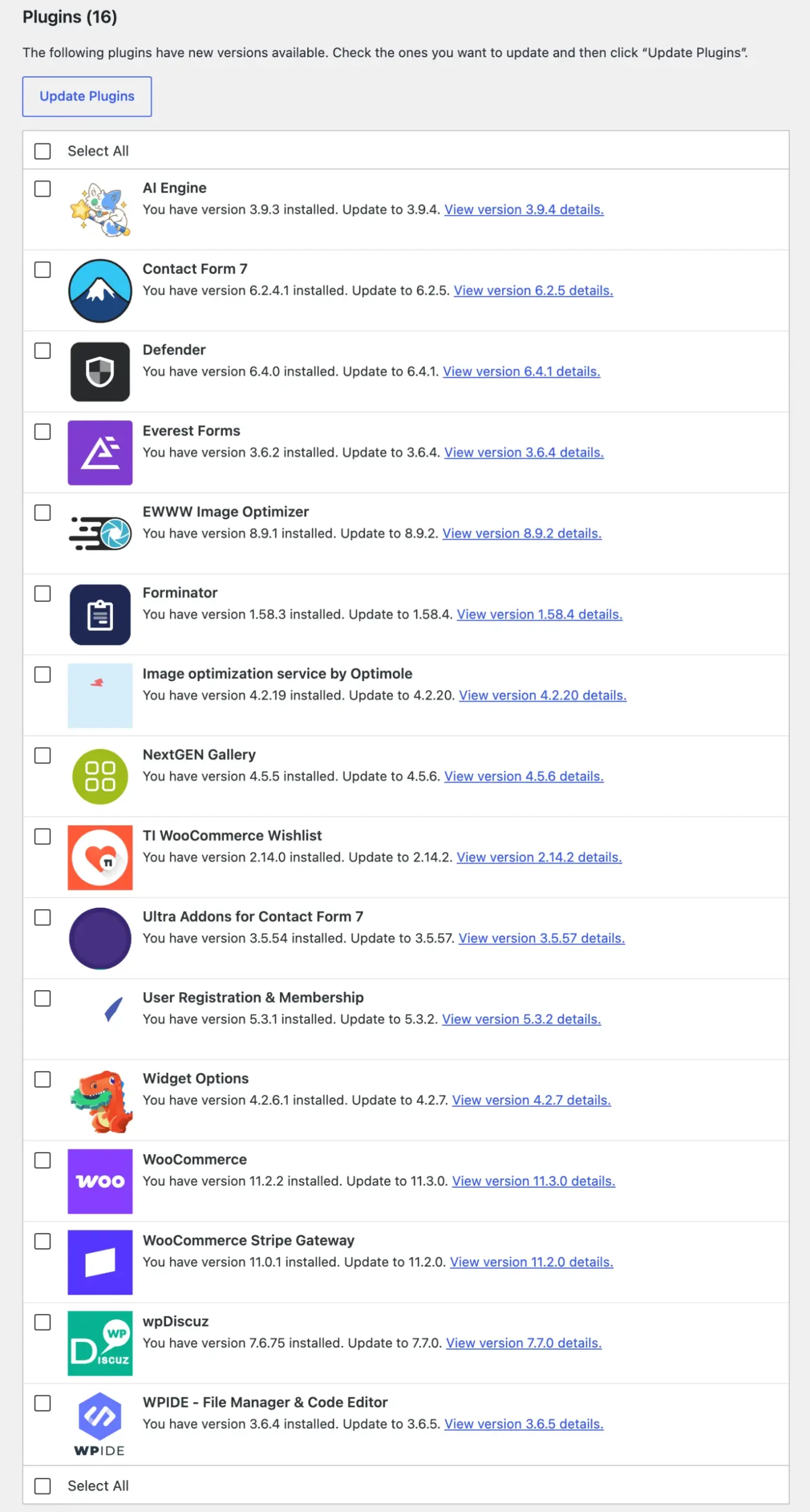
Highest risk
AI Engine 3.9.3 and older: a web page disguised as an audio file
90,000+ installs · CVSS 7.1 · CVE-2026-123478 and CVE-2026-125804 (Patchstack) · fixed in 3.9.2 and 3.9.4 · known to be exploited
AI Engine lets visitors attach files to a chatbot conversation or an AI form. Until 3.9.2 it judged an upload by its file name only. A visitor could upload an HTML page named like an audio file, and it was stored in the public uploads folder. On servers that send unknown file types without a content type, a browser opens such a file as a web page on your domain, and a logged-in user who follows a link to it runs the attacker’s script with their own rights. Patchstack marks the bug as exploited. It is the third AI Engine bug to get that badge.
The vendor fixed it nine hours after the report: 3.9.2, released on November 6, checks what a file contains. A second report on the same upload path followed on November 12, and 3.9.4 from the same day blocks any file a browser would run as a web page. So 3.9.2 and 3.9.3 are not enough.
Only sites where visitors can upload are in range: a chatbot or an AI form with file upload enabled, or the plugin’s Public API switched on. A chatbot that only takes text is not.
Update now, to 3.9.4. If uploads were open to visitors on 3.9.1 or older, look through the AI Engine folder in wp-content/uploads for files that are not what their extension says, and delete them.
Ninja Forms File Uploads 3.3.36 and older: a visitor deletes wp-config.php
Premium add-on for Ninja Forms (500,000+ installs) · CVSS 9.1 · CVE-2026-126537 (Wordfence) · fixed in 3.3.37 · known to be exploited
File Uploads is the paid add-on that gives Ninja Forms its upload field. According to Wordfence, an anonymous visitor could make the server delete any file the web server is allowed to delete through a form with such a field. The usual target is wp-config.php: without it WordPress shows its install screen, and whoever finishes the installation owns the site. The advisory also describes the chosen file being copied to the form’s connected cloud storage before it is deleted, so treat it as a file read too.
3.3.37 came out on November 2, nine days before the advisory, and its changelog only speaks of hardening how uploaded file data is handled. Patchstack marks the bug as exploited, as it did with two earlier File Uploads bugs this year. The add-on doesn’t come from WordPress.org, so the update arrives through your Ninja Forms license, not the usual plugin feed. The advisory text suggests the vulnerable path belongs to uploads sent to Amazon S3, Dropbox or Google Drive. We couldn’t check the code of a premium add-on, so don’t count on that condition.
Update now, to 3.3.37, on every site that has the add-on, whether or not a form uses it right now.
Estatik 4.3.6 and older: file inclusion on every site that runs it
10,000+ installs · CVSS 9.8 · CVE-2026-125795 (Patchstack) · fixed in 4.3.7 · known to be exploited
Estatik is a real estate listings plugin. Its listing search answers requests from logged-out visitors, and until 4.3.7 a visitor could make it load a file of their choice from the server as a PHP template. Nothing has to be switched on: the endpoint is there as soon as the plugin is active. On its own that exposes and runs files that already exist. Together with any way to place a file on the server it becomes code execution, and 4.3.7 also tightened the avatar upload and closed a way to register while registration was disabled. Patchstack marks the bug as exploited.
The fix took 17 days from the report and landed on WordPress.org on November 12. It finishes a job 4.3.6 had started: that release already added a check on the template name, and it only refused paths that began with the admin folder. Every Estatik release since 4.3.2 has carried security fixes.
Update now. If a site ran 4.3.6 or older, look for user accounts you don’t recognize and for unexpected files in the uploads folder.
Masterstudy theme 4.8.151 and older: any student can become an administrator
Premium theme, 22,000+ sales · CVSS 8.8 · CVE-2026-13764 (Wordfence) · fixed in 4.8.152 · known to be exploited
Masterstudy is a theme for online course sites. One of its admin actions had no permission check and let any logged-in user set the theme’s developer access token, and the theme’s developer login then handed out an administrator session. The advisory says “Subscriber”, but on a course site registration is the product: anyone who can sign up as a student qualifies.
The fix is four months old. Patchstack names 4.8.152, released on July 13, five days after the vendor was told, and the theme’s changelog for that version only mentions compatibility with WPBakery. The CVE followed on November 12, and Patchstack marks it as exploited. The theme is on 4.8.164 now. Sites that kept it updated since the summer are fine. Themes bought once and never updated again are the ones in range.
Update now, to the current 4.8.164, through the theme’s own updater. If the site ran 4.8.151 or older with open registration, go through the administrator accounts.
High risk
Widget Options 4.2.6.1 and older: the fix from three weeks ago didn’t hold
100,000+ installs · CVSS 8.8 · CVE-2026-116615 (Wordfence) · fixed in 4.2.7
Our report for the last week of October told you to update Widget Options to 4.2.6, which fixed code execution for Authors through the plugin’s Display Logic. That fix was incomplete. Display Logic runs short PHP conditions to decide where a block or widget shows, and since 4.2.6 the plugin strips such conditions from content saved by anyone who isn’t an administrator. The filter that strips them and the code that later runs them read the content differently, so a crafted block passed the first and was still run by the second. Wordfence told the vendor on October 26, the day 4.2.6 came out. 4.2.7, with one shared parser for both sides, followed on November 11.
An Author can use it directly. A Contributor needs someone to publish their post. Once the post is live, the condition runs for every visitor. By default it can only call a list of allowed functions, which according to Wordfence is still enough to read settings and user data one yes-or-no question at a time. It turns into unrestricted code execution on sites where another plugin has extended that list.
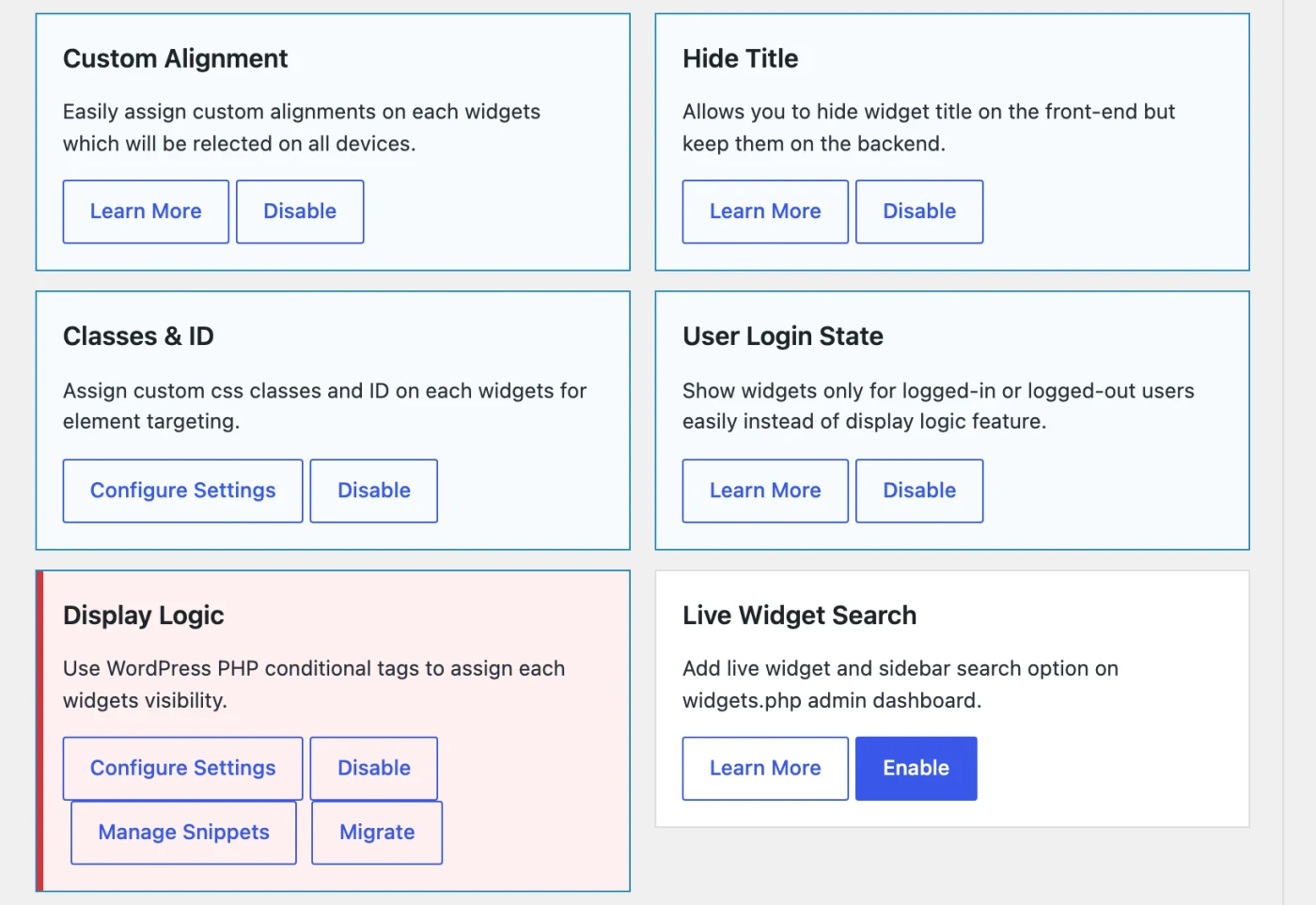
It is the fifth Display Logic fix in the plugin’s changelog: 4.2.0, 4.2.3, 4.2.4, 4.2.6 and now 4.2.7. If you don’t use conditions on widgets or blocks, switch the module off instead of waiting for the sixth.
Update now, to 4.2.7, also if you already updated to 4.2.6 or 4.2.6.1 last month. Remove Author accounts that nobody uses.
Optimole 4.2.19 and older: a comment that deletes files when you rename a picture
200,000+ installs · CVSS 7.1 · CVE-2026-124969 (Wordfence) · fixed in 4.2.20
Last week we told you to update Optimole to 4.2.19 for three stored scripts. 4.2.19 is the affected version of this week’s bug. Optimole adds a “Rename” control to media files, and when an administrator renames a file, the plugin walks through the database to replace the old address. While doing that it read stored values in a way that let a prepared value set off actions on the server. An anonymous visitor could plant such a value through the comment form, in the comment text or in the browser name WordPress saves with it. From reading the code, a comment held for moderation is enough.
Nothing happens until someone renames a media file, and according to Wordfence the server also needs a common PHP library, Archive_Tar, which ships with the official WordPress Docker images and many PHP packages. Then the result is file deletion, with wp-config.php as the obvious target. The rename feature has no switch, so it is there on every site that runs Optimole. 4.2.20 came out on November 12, three days after the report. It is Optimole’s third security release in ten days.
Update now, to 4.2.20, and update before you rename anything in the media library. Once 4.2.20 is in place, a value planted earlier does nothing.
EWWW Image Optimizer 8.9.1 and older: a stored script in the page rewriting
1,000,000+ installs · CVSS 7.1 · CVE-2026-124254 (Patchstack) · fixed in 8.9.2
Patchstack describes a stored cross-site scripting bug that needs no login to plant, and gives no detail. The 8.9.2 changelog says the release “improved HTML attribute parsing applied to all front-end filters”, and the code change is in the part of the plugin that rewrites finished pages: Lazy Load, WebP delivery and Easy IO. Sites that use EWWW only to compress images on upload don’t run that code. Sites with one of those three options on do, on every page.
Neither source says how the visitor’s text gets into the page. It is the same kind of bug as the comment scripts further down, where a plugin re-reads the finished page and turns harmless markup into live markup, and the same researcher reported this week’s wpDiscuz bug, so the comment form is the likely door. We haven’t confirmed it. 8.9.1 from October 29 already tightened the same parser for another bug and is still affected.
Update now, to 8.9.2, released on November 10.
WPIDE 3.6.4 and older: one visit by an admin can write PHP
40,000+ installs · CVSS 8.8 · CVE-2026-124251 (Patchstack) · fixed in 3.6.5
WPIDE is a file manager and code editor inside wp-admin. Some of its entry points didn’t check that a request really came from the admin screen, so a page controlled by an attacker could send requests in the name of an administrator who happened to be logged in. The administrator only has to open that page. Nothing in WPIDE has to be clicked. Because the plugin exists to create and edit files, a forged request can write PHP into a plugin or theme, which is a full takeover.
Two releases came out on November 8, two hours apart. 3.6.4 enforces the check on every WPIDE request, and 3.6.5 adds a second layer that Patchstack suggested. Patchstack counts 3.6.4 as affected, so 3.6.5 is the version to be on.
Update now, to 3.6.5. A code editor on a live site is worth a second thought anyway: if you only need it now and then, deactivate it in between.
Flatsome 3.20.12 and older: drafts readable by anyone
Premium theme · CVSS 5.3 · CVE-2026-117487 (WPScan), plus CVE-2026-117490 and CVE-2026-18742 · fixed in 3.20.13
Flatsome is the best-selling WooCommerce theme on ThemeForest. One of its public endpoints rendered posts by ID without checking who was asking, so anyone could read the content of draft and pending posts. No setting is involved. Think of unannounced products, prices and pages that are still being written.
3.20.13, dated November 10, fixes it and says so in the changelog (“Unpublished posts could be read through the public shortcode AJAX endpoint”). The same release covers two bugs for Contributors: publishing their own content and changing its post type through UX Builder, and a stored script through HTML attributes. Flatsome updates through its Envato license. A copy that was never registered does not get the update offered.
Update now, to 3.20.13, and make sure the site’s copy of the theme is registered, or the update won’t show up.
Document Library Pro before 4.2.2: object injection without login
Premium · CVSS 9.8 · CVE-2026-122662 (Patchstack) · fixed in 4.2.2
Barn2’s Document Library Pro read data from visitors in a way that lets them hand the site a prepared PHP object. How bad that is depends on what else is installed: with a suitable chain of code in another plugin or theme it ends in code execution or file deletion, without one it does nothing. The changelog for 4.2.2 (November 4) has one security line, about custom field indexing, filters and frontend submissions, which points at pages that show the library or its submission form. 4.2.3 from November 11 adds three more security fixes.
Update now, to 4.2.3, through the plugin’s own updater.
myCred 4.0.2 and older: twelve records and a fix we couldn’t find
10,000+ installs · CVSS 8.5 and 7.5 · CVE-2026-125811 and CVE-2026-123465 (Patchstack) · fixed in 4.0.3 according to the advisory
myCred is a points and rewards plugin, and its sites usually let people register. Patchstack lists twelve records for 4.0.2 and older with 4.0.3 as the fix, five of them in this week’s data. The two that matter are a SQL injection that needs a Contributor account and a data exposure without login.
We compared 4.0.2 with 4.0.3. The release changes a payment gateway callback, a hook for a polls plugin and the admin Logs page. No database query changed. Patchstack received the SQL injection report on November 5, nine days after 4.0.3 came out, and 4.0.3 is still the newest version. So either the affected range is too wide or the bug is still there. We can’t tell which from the outside.
Update now, to 4.0.3, the only step available. Until a newer release names the fix, keep the Contributor role and anything above it away from accounts you don’t know.
Depends on your setup
The updates are just as urgent here. The condition tells you which sites to look at more closely.
Basel theme: a login for any account where social login is set up
Premium theme, 10,000+ sales · CVSS 9.8 · CVE-2026-89324 (Wordfence) · Basel Post Types 1.18 and older · known to be exploited
Basel is a WooCommerce theme by XTemos, and Basel Post Types is the plugin that ships with it. Its social login signed the provider’s answer with a fixed value that sits in the plugin’s code, so anyone could produce a valid answer. With the email address of an account, an attacker could log in as that user, an administrator included, without a password and past any two-factor step. It only works where WooCommerce is active and at least one provider (Facebook, Google or VKontakte) has its app ID and secret filled in under the theme settings. Patchstack marks it as exploited.
Patchstack names plugin version 1.19 as the fix. The theme’s changelog has no matching entry, and ThemeForest shows an update on November 10, the day of the disclosure, so the fix seems to have gone out without a note. The plugin updates through the theme, not through WordPress.org.
Update now: update the theme and then its bundled plugins, and check that Basel Post Types says 1.19 or newer. If social login isn’t used, clear the provider keys.
AutomatorWP Webhooks 1.4.4 and older: a webhook that resets passwords
Premium add-on · CVSS 9.8 · CVE-2026-126173 (Wordfence) · fixed in 1.4.5 · known to be exploited
The bug sits in a setup the plugin documents and supports: an automation that starts with “Receive data from webhook”, marks one incoming field as the user ID, and runs an Update User action that takes the password from the webhook data. Nothing checked who was calling the webhook, so anyone who knew its address could set a new password for any account. Sites with the add-on but without such an automation are not exposed. The free AutomatorWP on WordPress.org has no webhooks and is not involved.
1.4.5 (November 12, also in the AutomatorWP Pro bundle from 6.0.5) adds a feature called “Protect Webhook”. We couldn’t confirm that it is on by default for webhooks that already exist.
Update now, then open every webhook trigger and make sure protection is on.
Ultra Addons for Contact Form 7 3.5.54 and older: a second exploited bug, same release
60,000+ installs · CVSS 7.5 · CVE-2026-100386 (Wordfence) · fixed in 3.5.55 · known to be exploited
Last week’s report had an exploited file deletion in this plugin’s PDF Generator. This week’s record is a file read in the same place: an anonymous visitor submits the form, and the generated PDF contains a file from the server, wp-config.php for example. Patchstack marks this one as exploited too. Both are fixed by the same change in 3.5.55 from October 10, so if you followed last week’s advice, you are covered. The conditions are the same as well: “PDF Generate” switched on under UACF7 Addons, and the PDF Generator enabled on a form.
Update now, to the current 3.5.57. If PDF Generator was on with 3.5.54 or older, treat wp-config.php as read: change the database password and the security keys.
Forminator and User Registration: a paid sign-up without the payment
600,000+ and 50,000+ installs · CVSS 8.1 · CVE-2026-111579 and CVE-2026-109870 (WPScan) · fixed in Forminator 1.58.4 and User Registration & Membership 5.3.2
Two plugins, one pattern: a registration form that hands out a role after payment, and a way to skip the payment. Both titles say “privilege escalation without login”. What the visitor gets is the role the site owner put on the form or plan. That is an administrator account only where someone configured it so. In the usual setup it is a free membership.
In Forminator, a User Registration form with a Stripe field carried on as a free form when Stripe wasn’t ready, for example after the Stripe connection had been removed under Forminator → Settings → Payments while the field stayed on the form. 1.58.4 refuses the submission instead. A second record lets a visitor who starts a Stripe Checkout and doesn’t pay read the form’s thank-you message or redirect address, which matters if a download sits behind it. 1.58.4 reached WordPress.org on November 2, and last week’s report already recommended it. The record says the bug starts at 1.58.0. We found the same code in 1.57.3.1, so don’t rely on being on an older version.
In User Registration & Membership, a 100% coupon was accepted for a one-time paid plan without checking that it was active, in date and meant for that plan. Coupons are part of the Pro plans, so this is a bug for Pro sites. 5.3.2 (November 6) fixes it together with four more records, two of them other ways around the payment step.
Update now: Forminator to 1.58.4, User Registration & Membership to 5.3.2. On both, check which role your paid forms and plans assign, and look through recent sign-ups for members without a payment.
Everest Forms 3.6.3 and older: two fixes in two releases
90,000+ installs · CVSS 7.5 and 8.2 · CVE-2026-115483 and CVE-2026-120513 (Wordfence) · fixed in 3.6.4 and 3.6.3
The free plugin carries the code, but both bugs need paid parts. The file read needs Everest Forms Pro: a form with a signature field whose email notification has “Attach Files” on and goes to an address the visitor types in. The visitor then receives a server file as an attachment, and Wordfence names wp-config.php. 3.6.4 (November 5) fixes it. 3.6.3 is still affected.
The file deletion needs the paid Save and Continue add-on, a form with an upload field and “Disable storing entry information” switched on in the form’s general settings. It mostly reaches files inside the uploads folder. 3.6.3 from October 15 fixes it.
Update now, to 3.6.4. If a Pro site had a signature form that emails the person who submits it, change the database password and the security keys.
WooCommerce 11.0.0 to 11.2.2: someone else’s guest orders in your account
7,000,000+ installs · CVSS 6.5 · CVE-2026-125801 (Patchstack) · fixed in 11.3.0
Patchstack calls it a race condition and gives no detail. The score assumes no login, while Patchstack’s own page says a Subscriber account is required, which on a shop means any customer. It is not about coupons, stock or payments. The matching change in 11.3.0 is in the customer email verification that arrived with 11.0.0: confirming an address also attaches earlier guest orders placed with that address to the account. By changing the account’s email at the right moment, a customer could get an address they don’t own marked as verified, and see those guest orders with their names, addresses and items. That reading is ours, from the code change. Neither Patchstack nor WooCommerce has described the bug.
11.3.0 came out on November 11. There are no point releases for 11.0, 11.1 or 11.2, so those sites have to move to 11.3.0. Note that 11.2.2 from November 4 was a security release itself and is still in the affected range.
Update now, to 11.3.0.
WooCommerce Stripe Gateway: customer passwords saved with the order
700,000+ installs · CVSS 4.4 · CVE-2026-123145 (WPScan) · written by 10.9.0, removed by 11.1.0
This is not a bug someone can attack from outside. It is data that should never have been stored. Version 10.9.0 saved the fields of the checkout form with the order when a customer paid with an express button such as Apple Pay or Google Pay on the classic checkout page. On shops where customers choose their own password at checkout, that included the password, in plain text, in the order’s custom fields. It only happened where the account settings let customers set a password during checkout. Shops that send a password setup link never showed the field.
10.9.0 was current from August 17 to August 31. 10.9.1 stopped the saving without mentioning it. The stored values stayed until 11.1.0 (October 13), which removes them in the background and compares each one with the account’s current password first. When it is done, the site administrator gets an email with the subject “[WooCommerce Stripe] Customer password data removed from order records”, saying how many accounts still use a password that was stored. It resets none of them.
Until the cleanup, administrators and shop managers could see those passwords on the order screen, and so could anything that reads orders: exports, integrations, backups.
Update now, to 11.2.0. Then look for that email or the admin notice. If accounts were flagged, force a password reset for them and tell the customers, because people reuse passwords. If WooCommerce → Status → Scheduled Actions shows the cleanup stuck, fix WP-Cron first.
Contact Form 7 6.2.4.1 and older: 6.2.5 is the version to be on
10,000,000+ installs · CVSS 4.5 · CVE-2026-120407 (WPScan) · fixed in 6.2.5
Last week we said 6.2.4.1. Contact Form 7 6.2.5 followed on November 10 with two smaller fixes, and the author’s own words fit: “The risk level is not high, but it’s about security”. A form field can take its default value from the logged-in visitor’s profile. Until 6.2.5 it could take any stored value of that user, so an Editor could build a form that loads an administrator’s password hash or two-factor secret into a field and receive it when the administrator submits the form. From 6.2.5 on, only seven harmless fields such as name and email are allowed. The second fix stops mail tags from leaking the content of posts that aren’t public.
It takes a hostile or hijacked Editor account and an administrator who fills in that Editor’s form, so this matters on sites with several editors, less on a one-person site. One catch: the 6.1 line has the same code and no fix. Sites below WordPress 7.1 or PHP 8.3 can’t install 6.2 at all, and they stay on 6.1.7 until the server is upgraded.
Update now, to 6.2.5. 6.2.4.1 still covers last week’s upload bug, but not these two.
Defender Security 6.4.0 and older: unlimited guesses at the two-factor code
80,000+ installs · CVSS 7.5 · CVE-2026-119040 (WPScan) · fixed in 6.4.1
An attacker who already has a user’s password could keep guessing the six-digit code. Defender only counted failed codes when its Login Protection module was active, and that module is off by default (Defender → Firewall → Login Protection). App codes, backup codes and emailed codes are affected, passkeys are not. 6.4.1 always counts and stops after five attempts in 30 minutes. The same release fixes a way to fake the visitor’s IP address, which could be used to dodge lockouts.
It is the third security plugin in three weeks whose second factor didn’t hold, after All-In-One Security and Security Optimizer, and the same researcher found the same missing limit in Security Optimizer. 6.4.1 reached WordPress.org on November 9.
Update now, to 6.4.1. The second factor only comes into play once a password has leaked, so this is also a reminder about reused passwords.
Comment scripts, week six: wpDiscuz, Orphans and three more
60,000+ and 50,000+ installs · CVSS 7.1 · CVE-2026-125818 and CVE-2026-125791 (Patchstack) · fixed in wpDiscuz 7.7.0 and Orphans 3.5.0
For the sixth week in a row, plugins are fixing scripts that arrive through the comment form. The mechanism hasn’t changed: WordPress cleans the comment, and then a plugin re-reads the finished page and turns the harmless markup back into something a browser runs. Five of this week’s records are confirmed to work this way.
- wpDiscuz 7.6.75 and older: the “Image Source URL to Image Conversion” option, on by default, turned image addresses into pictures even inside HTML markup. The changelog is unusually direct: a crafted comment “could run JavaScript for moderators viewing it while pending, and for every visitor once it was approved”. Holding comments for moderation doesn’t help, because the moderator is the first target. Fixed in 7.7.0 (November 12), which also raises the minimum to PHP 8.0, so sites on PHP 7.4 are not offered the fix.
- Orphans 3.4.6 and older: the plugin fixes line breaks in Polish text and re-read comment markup with the same bundled HTML parser that iubenda used. 3.5.0 (November 12) removes the parser.
- Lightbox with PhotoSwipe (20,000+, fixed in 5.19.0), wpLingua (2,000+, fixed in 3.2.0) and EZ SQL Reports (fixed in 5.26.45) follow the same route.
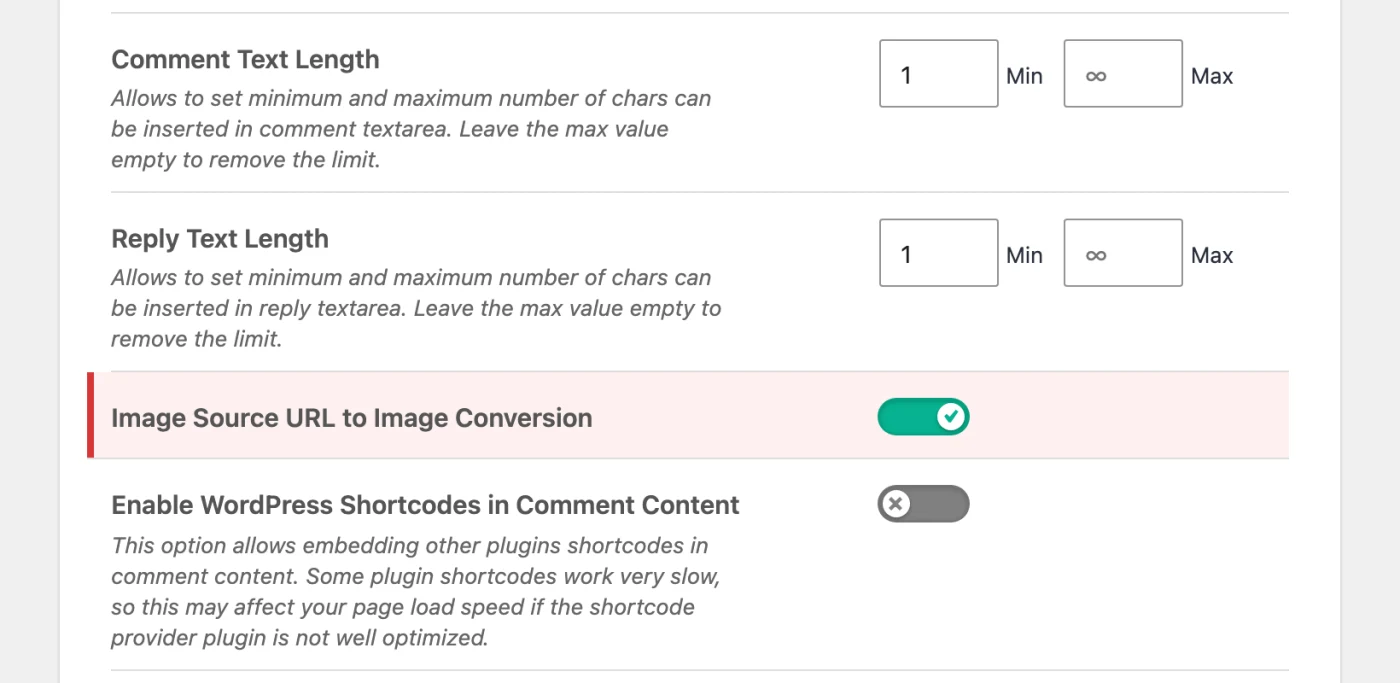
Four more page-rewriting plugins fixed stored scripts this week without saying where the text comes from: EWWW Image Optimizer (above), Featured Image from URL (60,000+, fixed in 6.1.5, 6.1.7 is current), ShortPixel Adaptive Images (10,000+, 3.12.0) and Flying Images (2,000+, 2.4.16). And two bugs elsewhere in this report use the same door for something other than a script: the Optimole file deletion, and a comment that makes iubenda’s parser loop forever and hang the page (CVE-2026-120854), fixed in the same 3.13.7 we listed last week.
Update now. If comments are open and you run a plugin that rewrites the finished page, such as lazy loading, translation, typography or a lightbox, give its updates priority.
WP Data Access 5.5.92 and older: the seventh record in three weeks
10,000+ installs · CVSS 8.5 · CVE-2026-125832 (Patchstack) · fixed in 5.5.93
Last week we said 5.5.92. This SQL injection affects 5.5.92. It is in the older Data Tables output, the one shown with the plugin’s shortcode, where a visitor’s search text ended up in a part of the query that was only prepared for the administrator’s own filter. Patchstack says a Subscriber account is required. 5.5.93 from November 13 is the fifth release in a row with a security fix, and one of the earlier bugs is still marked as exploited.
Update now, to 5.5.93.
No fix available: remove or replace
Thirteen of this week’s critical records have no fixed version, and for most of them none will come. WordPress.org closes a plugin when a reported hole goes unanswered. A closed plugin keeps running on the sites that have it, and the dashboard shows no notice, because there is no update to offer. If one of these names is in your plugin list, the plugin has to go.
- WP Duplicate (plugin folder
local-sync): file upload without login (CVE-2026-123751). WPScan says it is being exploited. Closed on November 9, no fix. Remove it now. - Security For WooCommerce (
ultimate-security-for-woocommerce): login as any user without a password (CVE-2026-123695), one of 15 open records. Closed in October. - 6Storage Rentals: a Subscriber can take over an administrator account (CVE-2026-103883). Closed on November 3.
- Hotel Booking Lite theme: file upload for any logged-in user (CVE-2026-125851). 2.5.2 came out on the day the CVE was published and changes nothing in the affected code.
- Abandoned for years and now closed, with records that will stay open: Confection, Grand Job, Advance Guest Post, Somatic Framework, PrintAura WooCommerce API, EASY-JS-WPAPI, Ahime Image Printer, Pay With a Tweet, AM Wishlist, Reset Database and Author Image.
Four maintained plugins have records without a fix as well. None is critical, and here the advice is to watch for an update: Image CAPTCHA for Contact Form 7 and WPForms (70,000+, the CAPTCHA can be bypassed and the method is public, CVE-2026-127206), YITH WooCommerce Gift Cards (10,000+, gift card balances can be inflated without login, CVE-2026-88813), Unbounce Landing Pages (10,000+, a stored script, CVE-2026-125854) and Sendcloud for WooCommerce (7,000+, CVE-2026-127207).
Back from last week
Several plugins from last week’s report got new records this week. If you followed last week’s advice:
- Contact Form 7, Optimole and WP Data Access: last week’s versions aren’t enough anymore. See above: 6.2.5, 4.2.20 and 5.5.93.
- s2Member: 261106 isn’t enough anymore. The record for a content injection without login (CVE-2026-125440) names 261110 as the fix.
- Strong Testimonials: last week there was no confirmed fix. A new record for a content injection without login (CVE-2026-121028) names 3.3.18, and 3.3.19 is current.
- SureCart: a stored script that needs an account (CVE-2026-124411) is fixed in 4.13.0. 4.13.1 is current.
- JetFormBuilder: 3.6.8.1 from last week covers this week’s two script records. 3.6.8.2, released today, adds two more security fixes.
- SureForms: last week’s list said 2.13.1. The advisory for a new access control record (CVE-2026-125763) says the same, but the researcher is credited in 2.14.0 (November 12). Go to 2.14.0.
- Ultra Addons for Contact Form 7, iubenda, Forminator, Spectra, Royal Elementor Addons, WP User Manager, Motors and Download Manager have new records too, but the versions from last week cover them. Nothing more to do.
Also on the list
Smaller install bases or narrower conditions, but if you run one of these, update it too.
- Pagelayer 2.1.7 to 2.2.0 (400,000+): the first bug we have covered in the new WordPress Abilities API. Pagelayer registered about 60 abilities and left most of them open to anyone who can write posts, so a Contributor could overwrite, publish or delete other people’s pages and change the site’s header and footer templates (CVE-2026-127094). No AI or MCP setup is needed on WordPress 6.9 and newer. Fixed in 2.2.1 back on September 16.
- NextGEN Gallery 4.5.5 and older (300,000+): file deletion for users who hold the “NextGEN Manage gallery” capability (CVE-2026-118191). Only Administrators have it by default, so it matters where gallery management was handed to another role. 4.5.6 has eleven security lines. Update to it either way.
- Spectra 2.20.5 and older (1,000,000+): three records. 2.20.6 fixes a stored script for Contributors in the Counter block (CVE-2026-125800). We found nothing in it that matches the two low-impact records without login, and there is no newer version.
- Premium Addons for Elementor (600,000+): a stored script for Contributors (CVE-2026-125762). The advisory names 4.11.117, which predates the report. The fix is in 4.11.118, and 4.11.120 is current.
- Gmail SMTP 1.2.3.23 and older (10,000+): anyone could run the plugin’s Google authorization step and replace the stored access token (CVE-2026-124267). At the least that breaks outgoing mail. After updating to 1.2.3.24, send a test email. The update changes the redirect address, so if you ever have to grant access again, change the redirect URI in your Google Cloud project first.
- Frontend Admin by DynamiApps 3.30.1 and older (8,000+): a public registration form gave every visitor the role set on the form, Editor included (CVE-2026-119506). Fixed in 3.30.2. Go to 3.30.4. After the update such a form creates default-role users until you allow privileged roles in the form’s special permissions.
- Advanced Form Integration 2.11.3 and older (9,000+): rated 9.8 for privilege escalation (CVE-2026-125769), but Administrator was already blocked on most routes. What remained was whatever role an integration’s “Create User” action had been given. Fixed in 2.11.5. There was never a 2.11.4 on WordPress.org.
- Burst Statistics before 3.7.5 (200,000+): a shared report link showed statistics outside its date range, and the “most visited” shortcode could reveal titles of draft posts (CVE-2026-124671 and CVE-2026-124673).
- FooBox Image Lightbox 2.8.7 and older (100,000+): the title says a stored script without login, but the description says it takes a Contributor on a default site, or a forum member where bbPress is installed (CVE-2026-120687). Fixed in 2.8.8.
- Testimonial Slider and Showcase 3.0.2 and older (20,000+): object injection for Contributors (CVE-2026-125449). Fixed in 3.0.3, one day after the report.
- Newsletters 4.18.1 and older (2,000+): a SQL injection that needs an account (CVE-2026-124265), marked as exploited by Patchstack. Fixed in 4.18.2. 4.18.3 fixes two more.
- Multisite only: Post Duplicator before 3.0.18 (200,000+), WP Ultimate CSV Importer before 9.2 (20,000+) and Code Snippets before 4.1.0 (1,000,000+) let the administrator of one site reach across the network. On a single site they change nothing an administrator couldn’t already do. Post Duplicator 3.0.19, released today, has a fix that applies to single sites too.
- Streamit theme (premium): its companion plugin before 1.3.10 let anyone call functions on the server (CVE-2026-126119). The matching theme release is 4.5.2 from October 28.
- Critical bugs in small plugins, all fixed: STAGGS 3.3.0 and older (code execution, fixed in 3.4.0), ELEX HelpDesk 3.3.9 and older (object injection, 3.4.0), Cloud Storage Manager for Fluent Forms 1.2.0 and older (file write, 1.2.5 since August), Alex Reservations (SQL injection, 2.4.9), WP BASE Booking (SQL injection, 6.6.1), Shipo (login as administrator, 1.8.1), Descope (account takeover, 1.2.0) and Chatterbug Forms (file upload, 1.1).
What to do now
- Update the exploited ones first: AI Engine (3.9.4), Ninja Forms File Uploads (3.3.37), Estatik (4.3.7), the Masterstudy and Basel themes with their bundled plugins, AutomatorWP Webhooks (1.4.5), Ultra Addons for Contact Form 7 (3.5.57) and Newsletters (4.18.3).
- Check the versions we gave you before: Widget Options should say 4.2.7, Optimole 4.2.20, Contact Form 7 6.2.5, WP Data Access 5.5.93.
- Look through your plugin lists for WP Duplicate, Security For WooCommerce and the other closed plugins named above, and remove them.
- On shops with the WooCommerce Stripe Gateway, find the email about customer password data and act on it.
- On membership sites with Forminator or User Registration & Membership, check which role paid forms assign and whether recent members actually paid.
- If comments are open, update every plugin that rewrites the finished page.
Where Must-Have Security fits
Updates close the holes on this list, and next week brings a new one. Several of this week’s bugs end in files or code on the server: WPIDE wrote PHP for a forged request, Widget Options ran conditions an Author had hidden in a post, Estatik loaded a file a visitor pointed it at, and AI Engine stored a web page that claimed to be audio. The takeovers in the Masterstudy and Basel themes and in AutomatorWP hand over administrator logins. From there, the usual next step is writing PHP to the server: a backdoor, a plugin, an edited theme file.
How this report is made
We take every CVE record for WordPress core, plugins and themes published in the CVE List between Monday and Sunday (UTC), as collected in our database. Install counts are from WordPress.org. Fixed versions come from the advisory, the plugin’s changelog or the code change itself, and where they disagree, we go with the code. For premium plugins and themes we can only read the vendor’s changelog, and we say so. “Known to be exploited” means Patchstack shows that badge on the bug. The screenshots were taken on a local test site running the affected versions. The ratings are ours.
The next report covers November 16 to 22 and comes out on Monday, November 23.